QuakesUI
Before we build the component tree of our Quakes product, it might be helpful to rebuild the sample project from Apple. There are two main custom components for our product:
QuakeList: A component to display ourQuakevalues in aSwiftUI.List. We give users the ability to control how they want their values to be sorted. We also give users the ability to filter by name with a search bar.QuakeMap: A component to display ourQuakevalues in aMapKit.Map. These values should match the values displayed inQuakeList.
We will follow a similar pattern to how we built our Animals product:
- Presenter Components are for “regular” SwiftUI: we don’t integrate with
ImmutableData. - Container Components are for integrating with
ImmutableData.
QuakeUtils
There are a few utilities on Quake that will be helpful for us. Select the QuakesUI package and add a new Swift file under Sources/QuakesUI. Name this file QuakeUtils.swift.
Here is an Array of sample values:
//  QuakeUtils.swift

import CoreLocation
import MapKit
import QuakesData
import SwiftUI

extension Quake {
  static var previewQuakes: Array<Self> {
    [
      .xxsmall,
      .xsmall,
      .small,
      .medium,
      .large,
      .xlarge,
      .xxlarge,
      .xxxlarge
    ]
  }
}
Here is a utility to format our magnitude property as a String:
//  QuakeUtils.swift

extension Quake {
  var magnitudeString: String {
    self.magnitude.formatted(.number.precision(.fractionLength(1)))
  }
}
Here is a utility to format our time property as a String:
//  QuakeUtils.swift

extension Quake {
  var fullDate: String {
    self.time.formatted(date: .complete, time: .complete)
  }
}
Here is a utility to construct a coordinate:
//  QuakeUtils.swift

extension Quake {
  var coordinate: CLLocationCoordinate2D {
    CLLocationCoordinate2D(
      latitude: self.latitude,
      longitude: self.longitude
    )
  }
}
Here’s a utility to map our magnitude property to Color values:
//  QuakeUtils.swift

extension Quake {
  var color: Color {
    switch self.magnitude {
    case 0..<1:
      return .green
    case 1..<2:
      return .yellow
    case 2..<3:
      return .orange
    case 3..<5:
      return .red
    case 5..<7:
      return .purple
    case 7..<Double.greatestFiniteMagnitude:
      return .indigo
    default:
      return .gray
    }
  }
}
StoreKey
Similar to our Animals product, we need to define an Environment variable where our Store instance will be saved. Add a new Swift file under Sources/QuakesUI. Name this file StoreKey.swift.
//  StoreKey.swift

import ImmutableData
import ImmutableUI
import QuakesData
import SwiftUI

@MainActor fileprivate struct StoreKey : @preconcurrency EnvironmentKey {
  static let defaultValue = ImmutableData.Store(
    initialState: QuakesState(),
    reducer: QuakesReducer.reduce
  )
}

extension EnvironmentValues {
  fileprivate var store: ImmutableData.Store<QuakesState, QuakesAction> {
    get {
      self[StoreKey.self]
    }
    set {
      self[StoreKey.self] = newValue
    }
  }
}
We can now use this Store instance as the value of our ImmutableUI.Provider:
//  StoreKey.swift

extension ImmutableUI.Provider {
  public init(
    _ store: Store,
    @ViewBuilder content: () -> Content
  ) where Store == ImmutableData.Store<QuakesState, QuakesAction> {
    self.init(
      \.store,
       store,
       content: content
    )
  }
}
Here is our ImmutableUI.Dispatcher:
//  StoreKey.swift

extension ImmutableUI.Dispatcher {
  public init() where Store == ImmutableData.Store<QuakesState, QuakesAction> {
    self.init(\.store)
  }
}
Here is our ImmutableUI.Selector:
//  StoreKey.swift

extension ImmutableUI.Selector {
  public init(
    id: some Hashable,
    label: String? = nil,
    filter isIncluded: (@Sendable (Store.State, Store.Action) -> Bool)? = nil,
    dependencySelector: repeat DependencySelector<Store.State, each Dependency>,
    outputSelector: OutputSelector<Store.State, Output>
  ) where Store == ImmutableData.Store<QuakesState, QuakesAction> {
    self.init(
      \.store,
       id: id,
       label: label,
       filter: isIncluded,
       dependencySelector: repeat each dependencySelector,
       outputSelector: outputSelector
    )
  }
}

extension ImmutableUI.Selector {
  public init(
    label: String? = nil,
    filter isIncluded: (@Sendable (Store.State, Store.Action) -> Bool)? = nil,
    dependencySelector: repeat DependencySelector<Store.State, each Dependency>,
    outputSelector: OutputSelector<Store.State, Output>
  ) where Store == ImmutableData.Store<QuakesState, QuakesAction> {
    self.init(
      \.store,
       label: label,
       filter: isIncluded,
       dependencySelector: repeat each dependencySelector,
       outputSelector: outputSelector
    )
  }
}
These extensions are optional; we could build our component tree without them, but we would be passing the Store key path in all these different places by-hand. It would add extra work for our product engineers. Defining these extension also helps prevent product engineers from shipping a bug and accidentally passing an incorrect key path.
Dispatch
Let’s define a Dispatch type for our component tree to dispatch action values. Add a new Swift file under Sources/QuakesUI. Name this file Dispatch.swift.
//  Dispatch.swift

import ImmutableData
import ImmutableUI
import QuakesData
import SwiftUI

@MainActor @propertyWrapper struct Dispatch: DynamicProperty {
  @ImmutableUI.Dispatcher() private var dispatcher

  init() {

  }

  var wrappedValue: (QuakesAction) throws -> Void {
    self.dispatcher.dispatch
  }
}
Similar to our Animals product, we only expose the dispatch function for action values. We do not expose the dispatch function for thunk operations. There might be some use cases where dispatching thunk operations from our component tree might be helpful for testing or prototyping, but our opinion is this is an anti-pattern for your production applications: component trees should dispatch action values, not thunk operations.
Select
Similar to our Animals data models, our Quakes data models adopt Equatable. When we build Selectors, the data returned by our Selectors will also conform to Equatable. We want the equality operator to be how our Selectors determine data has changed.
Add a new Swift file under Sources/QuakesUI. Name this file Select.swift. Here are extensions on ImmutableUI.Selector for us to use value equality:
//  Select.swift

import ImmutableData
import ImmutableUI
import QuakesData
import SwiftUI

extension ImmutableUI.DependencySelector {
  init(select: @escaping @Sendable (State) -> Dependency) where Dependency : Equatable {
    self.init(select: select, didChange: { $0 != $1 })
  }
}

extension ImmutableUI.OutputSelector {
  init(select: @escaping @Sendable (State) -> Output) where Output : Equatable {
    self.init(select: select, didChange: { $0 != $1 })
  }
}

extension ImmutableUI.Selector {
  init(
    id: some Hashable,
    label: String? = nil,
    filter isIncluded: (@Sendable (Store.State, Store.Action) -> Bool)? = nil,
    dependencySelector: repeat @escaping @Sendable (Store.State) -> each Dependency,
    outputSelector: @escaping @Sendable (Store.State) -> Output
  ) where Store == ImmutableData.Store<QuakesState, QuakesAction>, repeat each Dependency : Equatable, Output : Equatable {
    self.init(
       id: id,
       label: label,
       filter: isIncluded,
       dependencySelector: repeat DependencySelector(select: each dependencySelector),
       outputSelector: OutputSelector(select: outputSelector)
    )
  }
}

extension ImmutableUI.Selector {
  init(
    label: String? = nil,
    filter isIncluded: (@Sendable (Store.State, Store.Action) -> Bool)? = nil,
    dependencySelector: repeat @escaping @Sendable (Store.State) -> each Dependency,
    outputSelector: @escaping @Sendable (Store.State) -> Output
  ) where Store == ImmutableData.Store<QuakesState, QuakesAction>, repeat each Dependency : Equatable, Output : Equatable {
    self.init(
       label: label,
       filter: isIncluded,
       dependencySelector: repeat DependencySelector(select: each dependencySelector),
       outputSelector: OutputSelector(select: outputSelector)
    )
  }
}
These extensions are optional. If these extensions were not defined, product engineers would be responsible for defining their own didChange closures when every Selector is defined. There are some advanced use cases where this ability to configure and customize is helpful, but value equality is going to be a very good choice as a default for most products.
We can now begin to define the Selectors of our component tree. These will map to the Selectors we defined from AnimalsState. Let’s begin with SelectQuakes. This will return a Dictionary of Quake values for displaying our QuakeMap component.
//  Select.swift

@MainActor @propertyWrapper struct SelectQuakes: DynamicProperty {
  @ImmutableUI.Selector<ImmutableData.Store<QuakesState, QuakesAction>, Dictionary<Quake.ID, Quake>> var wrappedValue: Dictionary<Quake.ID, Quake>

  init(
    searchText: String,
    searchDate: Date
  ) {
    self._wrappedValue = ImmutableUI.Selector(
      id: ID(
        searchText: searchText,
        searchDate: searchDate
      ),
      label: "SelectQuakes(searchText: \"\(searchText)\", searchDate: \(searchDate))",
      filter: QuakesFilter.filterQuakes(),
      outputSelector: QuakesState.selectQuakes(
        searchText: searchText,
        searchDate: searchDate
      )
    )
  }
}

extension SelectQuakes {
  fileprivate struct ID : Hashable {
    let searchText: String
    let searchDate: Date
  }
}
Let’s take a closer look at the parameters we use to create our Selector:
- Our
outputSelectortakes two parameters: asearchTextand asearchDate. Our selector returns aDictionary. The operation to filter byStringandDateruns in linear time. - Our
filteris used to improve performance. We know that only a subset of action values could ever change ourQuakevalues: we don’t have to run ouroutputSelectorif we know an action value could not change ourQuakevalues. - Our
labelwill be helpful when we enable debug logging. - Our
idis a value that conforms toHashable. We use this value to help define the value of our Selector. This is similar — but distinct from — the identity of our Selector. The identity of our Selector is tied, throughSwiftUI.State, to the identity of our component. The identity of ourQuakeMapcomponent could stay consistent while our user changes thesearchTextandsearchDateat runtime. If we didn’t pass anid, we would see ourQuakeMapfail to update itsQuakevalues when the user updates their selections: this would be a bug. Ouridvalue is derived from two values: we define anIDtype that adoptsHashableand wrapssearchTextandsearchDate.
Let’s build SelectQuakesValues. This is the selector we use for our QuakeList. It returns an Array of Quake values. Our user has the ability to choose the options we use for sorting.
//  Select.swift

@MainActor @propertyWrapper struct SelectQuakesValues: DynamicProperty {
  @ImmutableUI.Selector<ImmutableData.Store<QuakesState, QuakesAction>, Dictionary<Quake.ID, Quake>, Array<Quake>> var wrappedValue: Array<Quake>

  init(
    searchText: String,
    searchDate: Date,
    sort keyPath: KeyPath<Quake, some Comparable & Sendable> & Sendable,
    order: SortOrder
  ) {
    self._wrappedValue = ImmutableUI.Selector(
      id: ID(
        searchText: searchText,
        searchDate: searchDate,
        keyPath: keyPath,
        order: order
      ),
      label: "SelectQuakesValues(searchText: \"\(searchText)\", searchDate: \(searchDate), keyPath: \(keyPath), order: \(order))",
      filter: QuakesFilter.filterQuakes(),
      dependencySelector: QuakesState.selectQuakes(
        searchText: searchText,
        searchDate: searchDate
      ),
      outputSelector: QuakesState.selectQuakesValues(
        searchText: searchText,
        searchDate: searchDate,
        sort: keyPath,
        order: order
      )
    )
  }
}

extension SelectQuakesValues {
  fileprivate struct ID<Value> : Hashable where Value : Sendable {
    let searchText: String
    let searchDate: Date
    let keyPath: KeyPath<Quake, Value>
    let order: SortOrder
  }
}
We construct our Selector with four values: in addition to searchText and searchDate, we also pass keyPath and order to choose how Quake values will be sorted. Because sorting is an O(n log n) problem, we also define a dependencySelector that can run in linear time.
Here is SelectQuakesCount:
//  Select.swift

@MainActor @propertyWrapper struct SelectQuakesCount: DynamicProperty {
  @ImmutableUI.Selector<ImmutableData.Store<QuakesState, QuakesAction>, Int>(
    label: "SelectQuakesCount",
    outputSelector: QuakesState.selectQuakesCount()
  ) var wrappedValue: Int

  init() {

  }
}
Here is SelectQuakesStatus:
//  Select.swift

@MainActor @propertyWrapper struct SelectQuakesStatus: DynamicProperty {
  @ImmutableUI.Selector<ImmutableData.Store<QuakesState, QuakesAction>, Status?>(
    label: "SelectQuakesStatus",
    outputSelector: QuakesState.selectQuakesStatus()
  ) var wrappedValue: Status?

  init() {

  }
}
Here is SelectQuake:
//  Select.swift

@MainActor @propertyWrapper struct SelectQuake: DynamicProperty {
  @ImmutableUI.Selector<ImmutableData.Store<QuakesState, QuakesAction>, Quake?> var wrappedValue: Quake?

  init(quakeId: String?) {
    self._wrappedValue = ImmutableUI.Selector(
      id: quakeId,
      label: "SelectQuake(quakeId: \(quakeId ?? "nil"))",
      outputSelector: QuakesState.selectQuake(quakeId: quakeId)
    )
  }
}
These three selectors all run in constant time; we won’t see a very impactful performance improvement by defining a dependencySelector and a filter.
PreviewStore
Similar to our Animals product, we will define a component for constructing a Store reference with some sample data already saved. We will use this when we build Container Components in Xcode Previews.
Add a new Swift file under Sources/QuakesUI. Name this file PreviewStore.swift.
//  PreviewStore.swift

import ImmutableData
import ImmutableUI
import QuakesData
import SwiftUI

@MainActor struct PreviewStore<Content> where Content : View {
  @State private var store: ImmutableData.Store<QuakesState, QuakesAction> = {
    do {
      let store = ImmutableData.Store(
        initialState: QuakesState(),
        reducer: QuakesReducer.reduce
      )
      try store.dispatch(
        action: .data(
          .persistentSession(
            .localStore(
              .didFetchQuakes(
                result: .success(
                  quakes: Quake.previewQuakes
                )
              )
            )
          )
        )
      )
      return store
    } catch {
      fatalError("\(error)")
    }
  }()
  private let content: Content

  init(@ViewBuilder content: () -> Content) {
    self.content = content()
  }
}

extension PreviewStore: View {
  var body: some View {
    Provider(self.store) {
      self.content
    }
  }
}
Debug
Similar to our Animals product, we want the ability to enable some enhanced debug logging when a component computes its body property. We will use launch arguments from Xcode to set a bool value on UserDefaults.
Add a new Swift file under Sources/QuakesUI. Name this file Debug.swift.
//  PreviewStore.swift

import SwiftUI

extension UserDefaults {
  fileprivate var isDebug: Bool {
    self.bool(forKey: "com.northbronson.QuakesUI.Debug")
  }
}

extension View {
  static func debugPrint() {
#if DEBUG
    if UserDefaults.standard.isDebug {
      self._printChanges()
    }
#endif
  }
}
QuakeMap
Most of what we built this chapter looks very similar to our Animals product. Our selectors were specialized for our Quakes product domain, but the patterns and conventions we follow carried over from what we learned before.
Our component tree will follow a similar strategy: common patterns and conventions with specialization for our product domain. Our Presenter Components are built just for our Quakes product, but our Container Components will look — and feel — similar to what we built for our Animals product.
Let’s begin with QuakeMap. We construct a MapKit.Map to display Quake values.

A common pattern with SwiftUI is composition: small components are assembled together. Our app is built from ImmutableData, but our Presenter Components are still going to be regular SwiftUI. Our QuakeMap presenter will display some components that could be defined as subcomponents. The decision to build from ImmutableData is orthogonal to the decision to compose small components or construct “one big” component. For now, let’s start with a small subcomponent that will be displayed in our Map.
Add a new Swift file under Sources/QuakesUI. Name this file QuakeMap.swift. Here is our first declaration:
//  QuakeMap.swift

import CoreLocation
import MapKit
import QuakesData
import SwiftUI

@MainActor fileprivate struct QuakeCircle {
  private let quake: Quake
  private let selected: Bool

  init(
    quake: Quake,
    selected: Bool
  ) {
    self.quake = quake
    self.selected = selected
  }
}
This component will help display a circle overlay in our Map component. Here is our body property:
//  QuakeMap.swift

extension QuakeCircle {
  var markerSize: CGSize {
    let value = (self.quake.magnitude + 3) * 6
    return CGSize(width: value, height: value)
  }
}

extension QuakeCircle: View {
  var body: some View {
    Circle()
      .stroke(
        self.selected ? .black : .gray,
        style: StrokeStyle(
          lineWidth: self.selected ? 2 : 1
        )
      )
      .fill(
        self.quake.color.opacity(
          self.selected ? 1 : 0.5
        )
      )
      .frame(
        width: self.markerSize.width,
        height: self.markerSize.width
      )
  }
}
We can Preview these from Xcode:
//  QuakeMap.swift

#Preview {
  ForEach(Quake.previewQuakes) { quake in
    HStack {
      QuakeCircle(
        quake: quake,
        selected: false
      ).padding()
      QuakeCircle(
        quake: quake,
        selected: true
      ).padding()
    }
  }
}
The next step is to construct this component in a MapContent type:
//  QuakeMap.swift

@MainActor fileprivate struct QuakeMarker {
  private let quake: Quake
  private let selected: Bool

  init(
    quake: Quake,
    selected: Bool
  ) {
    self.quake = quake
    self.selected = selected
  }
}

extension QuakeMarker: MapContent {
  var body: some MapContent {
    Annotation(coordinate: self.quake.coordinate) {
      QuakeCircle(quake: self.quake, selected: selected)
    } label: {
      Text(self.quake.name)
    }
    .annotationTitles(.hidden)
    .tag(self.quake)
  }
}
We’re not going to spend too much time documenting the behavior of these MapKit types, but we encourage you to explore the documentation and sample code from Apple if you want to learn more.1
Here is the main declaration of our QuakeMap root component:
//  QuakeMap.swift

@MainActor struct QuakeMap {
  private let listSelection: Quake.ID?
  @Binding private var mapSelection: Quake.ID?
  private let searchText: String
  private let searchDate: Date

  init(
    listSelection: Quake.ID?,
    mapSelection: Binding<Quake.ID?>,
    searchText: String,
    searchDate: Date
  ) {
    self.listSelection = listSelection
    self._mapSelection = mapSelection
    self.searchText = searchText
    self.searchDate = searchDate
  }
}
We construct our QuakeMap with four parameters:
- Our
listSelectionis an optionalQuake.IDvalue indicating whichQuakevalue is currently selected by ourQuakeList. - Our
mapSelectionis aSwiftUI.Bindingto an optionalQuake.IDvalue indicating whichQuakevalue is currently selected by ourQuakeMap. - Our
searchTextis aStringindicating the text the user entered from ourQuakeList. - Our
searchDateis aDateindicating the date the user selected from ourQuakeList.
We can now define a body property to construct our Container:
//  QuakeMap.swift

extension QuakeMap: View {
  var body: some View {
    let _ = Self.debugPrint()
    Container(
      listSelection: self.listSelection,
      mapSelection: self.$mapSelection,
      searchText: self.searchText,
      searchDate: self.searchDate
    )
  }
}
Remember the role of our Container: we integrate with ImmutableData for fetching and selecting. Our Container is meant to be lightweight; we do the “heavy lifting” of defining our SwiftUI component tree in our Presenter.
Here is the declaration of our Container:
//  QuakeMap.swift

extension QuakeMap {
  @MainActor fileprivate struct Container {
    @SelectQuakes private var quakes: Dictionary<Quake.ID, Quake>
    @SelectQuake var listQuake: Quake?
    @SelectQuake var mapQuake: Quake?

    private let listSelection: Quake.ID?
    @Binding private var mapSelection: Quake.ID?

    init(
      listSelection: Quake.ID?,
      mapSelection: Binding<Quake.ID?>,
      searchText: String,
      searchDate: Date
    ) {
      self._quakes = SelectQuakes(
        searchText: searchText,
        searchDate: searchDate
      )
      self._listQuake = SelectQuake(quakeId: listSelection)
      self._mapQuake = SelectQuake(quakeId: mapSelection.wrappedValue)
      self.listSelection = listSelection
      self._mapSelection = mapSelection
    }
  }
}
We pass the same four parameters from our Root through to our Container. This Container needs two selectors:
SelectQuakes: We select theDictionaryvalue of allQuakevalues that match for oursearchTextandsearchDate.SelectQuake: We select theQuakevalues representing the currentlistSelectionandmapSelection.
The argument could be made that SelectQuake is superfluous: we could also choose to select the correct Quake values from the Dictionary returned by SelectQuakes. Our SelectQuake selector runs in constant time; we don’t lose too much performance by doing things this way. It’s also possible there could be some more advanced use cases where a user could select a Quake which is expected to not be returned from SelectQuakes.
The next step is to construct our Presenter. Here is our body:
//  QuakeMap.swift

extension QuakeMap.Container: View {
  var body: some View {
    let _ = Self.debugPrint()
    QuakeMap.Presenter(
      quakes: self.quakes,
      listQuake: self.listQuake,
      mapQuake: self.mapQuake,
      listSelection: self.listSelection,
      mapSelection: self.$mapSelection
    )
  }
}
Here is the declaration of our Presenter:
//  QuakeMap.swift

extension QuakeMap {
  @MainActor fileprivate struct Presenter {
    private let quakes: Dictionary<Quake.ID, Quake>
    private let listQuake: Quake?
    private let mapQuake: Quake?
    private let listSelection: Quake.ID?
    @Binding private var mapSelection: Quake.ID?

    init(
      quakes: Dictionary<Quake.ID, Quake>,
      listQuake: Quake?,
      mapQuake: Quake?,
      listSelection: Quake.ID?,
      mapSelection: Binding<Quake.ID?>
    ) {
      self.quakes = quakes
      self.listQuake = listQuake
      self.mapQuake = mapQuake
      self.listSelection = listSelection
      self._mapSelection = mapSelection
    }
  }
}
Here is our body property:
//  QuakeMap.swift

extension CLLocationCoordinate2D {
  fileprivate func distance(to coordinate: CLLocationCoordinate2D) -> CLLocationDistance {
    let a = MKMapPoint(self);
    let b = MKMapPoint(coordinate);
    return a.distance(to: b)
  }
}

extension QuakeMap.Presenter {
  @KeyframesBuilder<MapCamera> private func keyframes(initialCamera: MapCamera) -> some Keyframes<MapCamera> {
    let start = initialCamera.centerCoordinate
    let end = self.listQuake?.coordinate ?? start
    let travelDistance = start.distance(to: end)

    let duration = max(min(travelDistance / 30, 5), 1)
    let finalAltitude = travelDistance > 20 ? 3_000_000 : min(initialCamera.distance, 3_000_000)
    let middleAltitude = finalAltitude * max(min(travelDistance / 5, 1.5), 1)

    KeyframeTrack(\MapCamera.centerCoordinate) {
      CubicKeyframe(end, duration: duration)
    }
    KeyframeTrack(\MapCamera.distance) {
      CubicKeyframe(middleAltitude, duration: duration / 2)
      CubicKeyframe(finalAltitude, duration: duration / 2)
    }
  }
}

extension QuakeMap.Presenter {
  private var map: some View {
    Map(selection: self.$mapSelection) {
      ForEach(Array(self.quakes.values)) { quake in
        QuakeMarker(quake: quake, selected: quake.id == self.mapSelection)
      }
    }
    .mapCameraKeyframeAnimator(
      trigger: self.listQuake,
      keyframes: self.keyframes
    )
    .mapStyle(
      .standard(
        elevation: .flat,
        emphasis: .muted,
        pointsOfInterest: .excludingAll
      )
    )
  }
}

extension QuakeMap.Presenter: View {
  var body: some View {
    let _ = Self.debugPrint()
    self.map
      .onChange(
        of: self.listSelection,
        initial: true
      ) {
        if self.mapSelection != self.listSelection {
          self.mapSelection = self.listSelection
        }
      }
      .navigationTitle(self.mapQuake?.name ?? "Earthquakes")
      .navigationSubtitle(self.mapQuake?.fullDate ?? "")
  }
}
There’s a lot of code here, but it’s mostly all just SwiftUI and MapKit. There’s nothing here that’s specific to ImmutableData; most of this code was copied directly from the Apple sample project.
Our mapSelection is a Binding: we can read and write values. There are two places we update this value: when the user selects a new Quake from the Map component and when the user selects a new Quake from the QuakeList component. If the value from QuakeList was updated, we also attempt to animate the area displayed so the Quake is visible.2
Here are two Xcode Previews:
//  QuakeMap.swift

#Preview {
  @Previewable @State var mapSelection: Quake.ID?
  PreviewStore {
    QuakeMap(
      listSelection: nil,
      mapSelection: $mapSelection,
      searchText: "",
      searchDate: .now
    )
  }
}

#Preview {
  @Previewable @State var mapSelection: Quake.ID?
  QuakeMap.Presenter(
    quakes: Dictionary(uniqueKeysWithValues: Quake.previewQuakes.map { ($0.quakeId, $0) }),
    listQuake: nil,
    mapQuake: nil,
    listSelection: nil,
    mapSelection: $mapSelection
  )
}
Support for MapKit from Xcode Previews might not work as well as more simple SwiftUI components. We recommend choosing “Preview as App” instead of “Preview in Canvas” if you see any problems with rendering.
QuakeList
Our QuakeList component displays a subset of Quake values: the user has the option to filter by date and name. We also have the option to delete Quake values from our local database and fetch new values from our remote store.
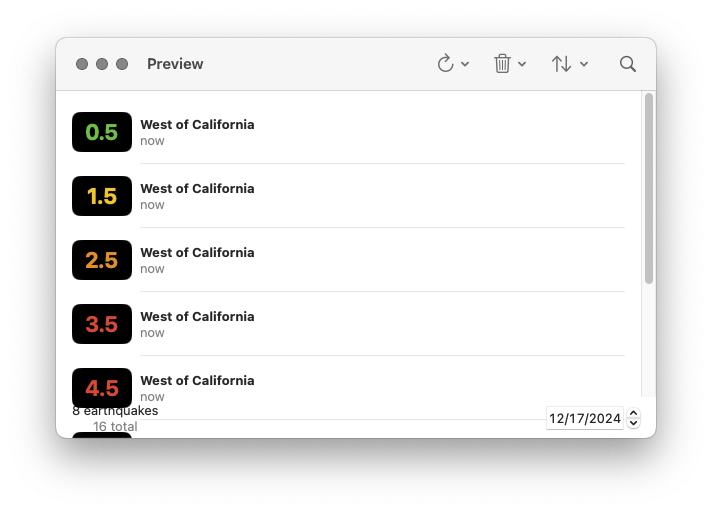
Add a new Swift file under Sources/QuakesUI. Name this file QuakeList.swift. We’re going to begin with some subcomponents needed in our Presenter. Let’s begin with a row component:
//  QuakeList.swift

import QuakesData
import SwiftUI

@MainActor fileprivate struct RowContent {
  private let quake: Quake

  init(quake: Quake) {
    self.quake = quake
  }
}

extension RowContent: View {
  var body: some View {
    HStack {
      RoundedRectangle(cornerRadius: 8)
        .fill(.black)
        .frame(width: 60, height: 40)
        .overlay {
          Text(self.quake.magnitudeString)
            .font(.title)
            .bold()
            .foregroundStyle(self.quake.color)
        }

      VStack(alignment: .leading) {
        Text(self.quake.name)
          .font(.headline)
        Text("\(self.quake.time.formatted(.relative(presentation: .named)))")
          .foregroundStyle(.secondary)
      }
    }
    .padding(.vertical, 8)
  }
}

#Preview {
  ForEach(Quake.previewQuakes) { quake in
    RowContent(quake: quake)
      .padding()
  }
}
This is just a Presenter: there is no interaction here with ImmutableData.
Our QuakeList displays a “footer” component. Here is where we display the number of earthquakes that match our filters, the total number of earthquakes in our system, and a DatePicker to choose a calendar date.
//  QuakeList.swift

@MainActor fileprivate struct Footer {
  private let count: Int
  private let totalQuakes: Int
  @Binding private var searchDate: Date

  init(
    count: Int,
    totalQuakes: Int,
    searchDate: Binding<Date>
  ) {
    self.count = count
    self.totalQuakes = totalQuakes
    self._searchDate = searchDate
  }
}

extension Footer: View {
  var body: some View {
    HStack {
      VStack {
        Text("\(self.count) \(self.count == 1 ? "earthquake" : "earthquakes")")
        Text("\(self.totalQuakes) total")
          .foregroundStyle(.secondary)
      }
      .fixedSize()
      Spacer()
      DatePicker(
        "Search Date",
        selection: self.$searchDate,
        in: (.distantPast ... .distantFuture),
        displayedComponents: .date
      )
      .labelsHidden()
      .disabled(self.totalQuakes == .zero)
    }
  }
}

#Preview {
  @Previewable @State var searchDate: Date = .now
  Footer(
    count: 8,
    totalQuakes: 16,
    searchDate: $searchDate
  )
  .padding()
}
This is just another Presenter: there is no interaction here with ImmutableData.
Our user has the option to sort Quake values by time or magnitude. They can also choose to sort values ascending or descending. It will be a little easier to construct our component if we define these options in two small types:
//  QuakeList.swift

extension QuakeList {
  fileprivate enum SortOrder: String, CaseIterable, Identifiable, Hashable, Sendable {
    case forward, reverse
    var id: Self { self }
    var name: String { self.rawValue.capitalized }
  }
}

extension QuakeList {
  fileprivate enum SortParameter: String, CaseIterable, Identifiable, Hashable, Sendable {
    case time, magnitude
    var id: Self { self }
    var name: String { self.rawValue.capitalized }
  }
}
We can then map these two types to the types needed for our SelectQuakesValues Selector:
//  QuakeList.swift

extension SelectQuakesValues {
  fileprivate init(
    searchText: String,
    searchDate: Date,
    sortOrder: QuakeList.SortOrder,
    sortParameter: QuakeList.SortParameter
  ) {
    switch (sortParameter, sortOrder) {
    case (.time, .forward):
      self.init(searchText: searchText, searchDate: searchDate, sort: \Quake.time, order: .forward)
    case (.time, .reverse):
      self.init(searchText: searchText, searchDate: searchDate, sort: \Quake.time, order: .reverse)
    case (.magnitude, .forward):
      self.init(searchText: searchText, searchDate: searchDate, sort: \Quake.magnitude, order: .forward)
    case (.magnitude, .reverse):
      self.init(searchText: searchText, searchDate: searchDate, sort: \Quake.magnitude, order: .reverse)
    }
  }
}
Here is the main declaration of our QuakeList root component:
//  QuakeList.swift

@MainActor struct QuakeList {
  @Binding private var listSelection: Quake.ID?
  private let mapSelection: Quake.ID?
  @Binding private var searchText: String
  @Binding private var searchDate: Date
  @State private var sortOrder: QuakeList.SortOrder = .forward
  @State private var sortParameter: QuakeList.SortParameter = .time

  init(
    listSelection: Binding<Quake.ID?>,
    mapSelection: Quake.ID?,
    searchText: Binding<String>,
    searchDate: Binding<Date>
  ) {
    self._listSelection = listSelection
    self.mapSelection = mapSelection
    self._searchText = searchText
    self._searchDate = searchDate
  }
}
We construct our QuakeList with four parameters:
- Our
listSelectionis a Binding to an optionalQuake.IDindicating whichQuakevalue is currently selected by ourQuakeList. - Our
mapSelectionis an optionalQuake.IDindicating whichQuakevalue is currently selected by ourQuakeMap. - Our
searchTextis a Binding to aStringvalue. This is the text our user entered in the Search Bar component. - Our
searchDateis a Binding to aDatevalue. This is the calendar date our user selected in theFootercomponent.
We save two additional SwiftUI.State properties: sortOrder and sortParameter. We will construct a component for the user to update these selections. Should this state be saved globally in ImmutableData? Maybe… but we would make the argument this is more appropriately saved as local component state. Remember our “Window Test”: if a user opens two different windows to display the same set of Quake values, should the user have the option to choose independent sortOrder and sortParameter values for each window? We believe our user would be more confused if updating the sortOrder in window number one also updated window number two; our user would expect that these windows can customize these values independently.
We can now define a body property to construct our Container:
//  QuakeList.swift

extension QuakeList : View {
  var body: some View {
    let _ = Self.debugPrint()
    Container(
      listSelection: self.$listSelection,
      mapSelection: self.mapSelection,
      searchText: self.$searchText,
      searchDate: self.$searchDate,
      sortOrder: self.$sortOrder,
      sortParameter: self.$sortParameter
    )
  }
}
Here is the declaration of our Container:
//  QuakeList.swift

extension QuakeList {
  @MainActor fileprivate struct Container {
    @SelectQuakesValues private var quakes: Array<Quake>
    @SelectQuakesCount private var totalQuakes: Int
    @SelectQuakesStatus private var status

    @Binding private var listSelection: Quake.ID?
    private let mapSelection: Quake.ID?
    @Binding private var searchText: String
    @Binding private var searchDate: Date
    @Binding private var sortOrder: SortOrder
    @Binding private var sortParameter: SortParameter

    @Dispatch private var dispatch

    init(
      listSelection: Binding<Quake.ID?>,
      mapSelection: Quake.ID?,
      searchText: Binding<String>,
      searchDate: Binding<Date>,
      sortOrder: Binding<SortOrder>,
      sortParameter: Binding<SortParameter>
    ) {
      self._quakes = SelectQuakesValues(
        searchText: searchText.wrappedValue,
        searchDate: searchDate.wrappedValue,
        sortOrder: sortOrder.wrappedValue,
        sortParameter: sortParameter.wrappedValue
      )
      self._listSelection = listSelection
      self.mapSelection = mapSelection
      self._searchText = searchText
      self._searchDate = searchDate
      self._sortOrder = sortOrder
      self._sortParameter = sortParameter
    }
  }
}
We are going to need to dispatch four action values back to ImmutableData. It will make things a little easier if we construct four private functions to help us:
//  QuakeList.swift

extension QuakeList.Container {
  private func onAppear() {
    do {
      try self.dispatch(.ui(.quakeList(.onAppear)))
    } catch {
      print(error)
    }
  }
}

extension QuakeList.Container {
  private func onTapRefreshQuakesButton(range: QuakesAction.UI.QuakeList.RefreshQuakesRange) {
    do {
      try self.dispatch(.ui(.quakeList(.onTapRefreshQuakesButton(range: range))))
    } catch {
      print(error)
    }
  }
}

extension QuakeList.Container {
  private func onTapDeleteSelectedQuakeButton(quakeId: Quake.ID) {
    do {
      try self.dispatch(.ui(.quakeList(.onTapDeleteSelectedQuakeButton(quakeId: quakeId))))
    } catch {
      print(error)
    }
  }
}

extension QuakeList.Container {
  private func onTapDeleteAllQuakesButton() {
    do {
      try self.dispatch(.ui(.quakeList(.onTapDeleteAllQuakesButton)))
    } catch {
      print(error)
    }
  }
}
We can then pass our properties and functions to our Presenter:
//  QuakeList.swift

extension QuakeList.Container: View {
  var body: some View {
    let _ = Self.debugPrint()
    QuakeList.Presenter(
      quakes: self.quakes,
      totalQuakes: self.totalQuakes,
      status: self.status,
      listSelection: self.$listSelection,
      mapSelection: self.mapSelection,
      searchText: self.$searchText,
      searchDate: self.$searchDate,
      sortOrder: self.$sortOrder,
      sortParameter: self.$sortParameter,
      onAppear: self.onAppear,
      onTapRefreshQuakesButton: self.onTapRefreshQuakesButton,
      onTapDeleteSelectedQuakeButton: self.onTapDeleteSelectedQuakeButton,
      onTapDeleteAllQuakesButton: self.onTapDeleteAllQuakesButton
    )
  }
}
Remember, our Presenter is where we build regular SwiftUI. There’s not going to be anything going on in here that is specifically tied to our ImmutableData architecture; that is what our Container is for.
Here is the declaration of our Presenter:
//  QuakeList.swift

extension QuakeList {
  @MainActor fileprivate struct Presenter {
    private let quakes: Array<Quake>
    private let totalQuakes: Int
    private let status: Status?
    @Binding private var listSelection: Quake.ID?
    private let mapSelection: Quake.ID?
    @Binding private var searchText: String
    @Binding private var searchDate: Date
    @Binding private var sortOrder: SortOrder
    @Binding private var sortParameter: SortParameter
    private let onAppear: () -> Void
    private let onTapRefreshQuakesButton: (QuakesAction.UI.QuakeList.RefreshQuakesRange) -> Void
    private let onTapDeleteSelectedQuakeButton: (Quake.ID) -> Void
    private let onTapDeleteAllQuakesButton: () -> Void

    init(
      quakes: Array<Quake>,
      totalQuakes: Int,
      status: Status?,
      listSelection: Binding<Quake.ID?>,
      mapSelection: Quake.ID?,
      searchText: Binding<String>,
      searchDate: Binding<Date>,
      sortOrder: Binding<SortOrder>,
      sortParameter: Binding<SortParameter>,
      onAppear: @escaping () -> Void,
      onTapRefreshQuakesButton: @escaping (QuakesAction.UI.QuakeList.RefreshQuakesRange) -> Void,
      onTapDeleteSelectedQuakeButton: @escaping (Quake.ID) -> Void,
      onTapDeleteAllQuakesButton: @escaping () -> Void
    ) {
      self.quakes = quakes
      self.totalQuakes = totalQuakes
      self.status = status
      self._listSelection = listSelection
      self.mapSelection = mapSelection
      self._searchText = searchText
      self._searchDate = searchDate
      self._sortOrder = sortOrder
      self._sortParameter = sortParameter
      self.onAppear = onAppear
      self.onTapRefreshQuakesButton = onTapRefreshQuakesButton
      self.onTapDeleteSelectedQuakeButton = onTapDeleteSelectedQuakeButton
      self.onTapDeleteAllQuakesButton = onTapDeleteAllQuakesButton
    }
  }
}
Our toolbar will construct three buttons: Refresh, Delete, and Sort. Let’s build our Refresh component:
//  QuakeList.swift

extension QuakeList.Presenter {
  private var refreshMenu: some View {
    Menu("Refresh", systemImage: "arrow.clockwise") {
      Button("All Hour") {
        self.onTapRefreshQuakesButton(.allHour)
      }
      Button("All Day") {
        self.onTapRefreshQuakesButton(.allDay)
      }
      Button("All Week") {
        self.onTapRefreshQuakesButton(.allWeek)
      }
      Button("All Month") {
        self.onTapRefreshQuakesButton(.allMonth)
      }
    }
    .pickerStyle(.inline)
  }
}
We construct a Menu component. Our user has four different options to fetch data. When our user makes a selection, we forward that option back to our Container and dispatch the correct Action value.
Here is our Delete component:
//  QuakeList.swift

extension QuakeList.Presenter {
  private var deleteMenu: some View {
    Menu("Delete", systemImage: "trash") {
      Button("Delete Selected") {
        if let quakeId = self.listSelection {
          self.onTapDeleteSelectedQuakeButton(quakeId)
        }
      }
      .disabled(self.listSelection == nil)
      Button("Delete All") {
        self.onTapDeleteAllQuakesButton()
      }
    }
    .pickerStyle(.inline)
    .disabled(self.totalQuakes == .zero)
  }
}
If the user is currently selecting a Quake value, they have the option to delete that value from the local database. If there is at least one Quake value in our global state, they also have the option to delete all Quake values from the local database. These are both actions on global state, so we forward those operations back to our Container.
Here is our Sort component:
//  QuakeList.swift

extension QuakeList.Presenter {
  private var sortMenu: some View {
    Menu("Sort", systemImage: "arrow.up.arrow.down") {
      Picker("Sort Order", selection: self.$sortOrder) {
        ForEach(QuakeList.SortOrder.allCases) { order in
          Text(order.name)
        }
      }
      Picker("Sort By", selection: self.$sortParameter) {
        ForEach(QuakeList.SortParameter.allCases) { parameter in
          Text(parameter.name)
        }
      }
    }
    .pickerStyle(.inline)
    .disabled(self.quakes.isEmpty)
  }
}
Our sortOrder and sortParameter values are both local component state. When the user makes a selection, we don’t forward that back to our Reducer. We pass a Binding to our Presenter and we perform an imperative mutation directly on that Binding. Because the sortOrder and sortParameter were originally defined as component state in our Root Component, changing those values will update our Container and our Selector.
Here is our List component:
//  QuakeList.swift

extension QuakeList.Presenter {
  private var list: some View {
    ScrollViewReader { proxy in
      List(selection: self.$listSelection) {
        ForEach(self.quakes) { quake in
          RowContent(quake: quake)
        }
      }
      .safeAreaInset(edge: .bottom) {
        Footer(
          count: self.quakes.count,
          totalQuakes: self.totalQuakes,
          searchDate: self.$searchDate
        )
        .padding(.horizontal)
        .padding(.bottom, 4)
      }
      .onChange(of: self.mapSelection) {
        if self.listSelection != self.mapSelection {
          self.listSelection = self.mapSelection
          if let quakeId = self.mapSelection {
            withAnimation {
              proxy.scrollTo(quakeId, anchor: .center)
            }
          }
        }
      }
    }
  }
}
Similar to our QuakeMap, we update our listSelection when the mapSelection updated. We also attempt to animate the area displayed so the Quake is visible.
Here is our body property:
//  QuakeList.swift

extension QuakeList.Presenter: View {
  var body: some View {
    let _ = Self.debugPrint()
    self.list
      .onAppear(perform: self.onAppear)
      .overlay {
        if self.totalQuakes == .zero {
          ContentUnavailableView("Refresh to load earthquakes", systemImage: "globe")
        } else if self.quakes.isEmpty {
          ContentUnavailableView.search
        }
      }
      .searchable(text: self.$searchText)
      .toolbar {
        self.refreshMenu
        self.deleteMenu
        self.sortMenu
      }
  }
}
Here is a Preview of our Root component:
//  QuakeList.swift

#Preview {
  @Previewable @State var listSelection: Quake.ID?
  @Previewable @State var searchText: String = ""
  @Previewable @State var searchDate: Date = .now
  PreviewStore {
    QuakeList(
      listSelection: $listSelection,
      mapSelection: nil,
      searchText: $searchText,
      searchDate: $searchDate
    )
  }
}
Here is a Preview of our Presenter component with zero Quake values in our global state:
//  QuakeList.swift

#Preview {
  @Previewable @State var listSelection: Quake.ID?
  @Previewable @State var searchText: String = ""
  @Previewable @State var searchDate: Date = .now
  @Previewable @State var sortOrder: QuakeList.SortOrder = .forward
  @Previewable @State var sortParameter: QuakeList.SortParameter = .time
  QuakeList.Presenter(
    quakes: [],
    totalQuakes: 0,
    status: nil,
    listSelection: $listSelection,
    mapSelection: nil,
    searchText: $searchText,
    searchDate: $searchDate,
    sortOrder: $sortOrder,
    sortParameter: $sortParameter,
    onAppear: {
      print("onAppear")
    },
    onTapRefreshQuakesButton: { range in
      print("onTapRefreshQuakesButton: \(range)")
    },
    onTapDeleteSelectedQuakeButton: { quakeId in
      print("onTapDeleteSelectedQuakeButton: \(quakeId)")
    },
    onTapDeleteAllQuakesButton: {
      print("onTapDeleteAllQuakesButton")
    }
  )
}
Here is a Preview of our Presenter component with zero Quake values returned from our Selector:
//  QuakeList.swift

#Preview {
  @Previewable @State var listSelection: Quake.ID?
  @Previewable @State var searchText: String = ""
  @Previewable @State var searchDate: Date = .now
  @Previewable @State var sortOrder: QuakeList.SortOrder = .forward
  @Previewable @State var sortParameter: QuakeList.SortParameter = .time
  QuakeList.Presenter(
    quakes: [],
    totalQuakes: 16,
    status: nil,
    listSelection: $listSelection,
    mapSelection: nil,
    searchText: $searchText,
    searchDate: $searchDate,
    sortOrder: $sortOrder,
    sortParameter: $sortParameter,
    onAppear: {
      print("onAppear")
    },
    onTapRefreshQuakesButton: { range in
      print("onTapRefreshQuakesButton: \(range)")
    },
    onTapDeleteSelectedQuakeButton: { quakeId in
      print("onTapDeleteSelectedQuakeButton: \(quakeId)")
    },
    onTapDeleteAllQuakesButton: {
      print("onTapDeleteAllQuakesButton")
    }
  )
}
Here is a Preview of our Presenter component with our sample Quake values returned from our Selector:
//  QuakeList.swift

#Preview {
  @Previewable @State var listSelection: Quake.ID?
  @Previewable @State var searchText: String = ""
  @Previewable @State var searchDate: Date = .now
  @Previewable @State var sortOrder: QuakeList.SortOrder = .forward
  @Previewable @State var sortParameter: QuakeList.SortParameter = .time
  QuakeList.Presenter(
    quakes: Quake.previewQuakes,
    totalQuakes: 16,
    status: nil,
    listSelection: $listSelection,
    mapSelection: nil,
    searchText: $searchText,
    searchDate: $searchDate,
    sortOrder: $sortOrder,
    sortParameter: $sortParameter,
    onAppear: {
      print("onAppear")
    },
    onTapRefreshQuakesButton: { range in
      print("onTapRefreshQuakesButton: \(range)")
    },
    onTapDeleteSelectedQuakeButton: { quakeId in
      print("onTapDeleteSelectedQuakeButton: \(quakeId)")
    },
    onTapDeleteAllQuakesButton: {
      print("onTapDeleteAllQuakesButton")
    }
  )
}
Content
We’re almost done. Let’s build a root component that ties it all together. Add a new Swift file under Sources/QuakesUI. Name this file Content.swift.
//  Content.swift

import QuakesData
import SwiftUI

public struct Content {
  @State private var listSelection: Quake.ID?
  @State private var mapSelection: Quake.ID?
  @State private var searchText: String = ""
  @State private var searchDate: Date = .now

  public init() {

  }
}

extension Content: View {
  public var body: some View {
    let _ = Self.debugPrint()
    NavigationSplitView {
      QuakeList(
        listSelection: self.$listSelection,
        mapSelection: self.mapSelection,
        searchText: self.$searchText,
        searchDate: self.$searchDate
      )
    } detail: {
      QuakeMap(
        listSelection: self.listSelection,
        mapSelection: self.$mapSelection,
        searchText: self.searchText,
        searchDate: self.searchDate
      )
    }
  }
}

#Preview {
  PreviewStore {
    Content()
  }
}
We save four values to our local component state. If one of the values is updated from QuakeList, we can then construct QuakeMap with the new values. If mapSelection is updated from QuakeMap, we can then construct QuakeList with the new value.
Here is our QuakesUI package:
QuakesUI
└── Sources
    └── QuakesUI
        ├── Content.swift
        ├── Debug.swift
        ├── Dispatch.swift
        ├── PreviewStore.swift
        ├── QuakeList.swift
        ├── QuakeMap.swift
        ├── QuakeUtils.swift
        ├── Select.swift
        └── StoreKey.swift
Our Quakes product has some big differences compared to our Animals product. Our Animals product used a local database for reading and writing data. Our Quakes product uses a remote server for reading data and a local database for writing data. The good news is that our component tree does not need to know about this: ImmutableData is an abstraction-layer. From the component tree, both products interact with ImmutableData in similar ways: we select data with Selectors and we dispatch actions on user events.