QuakesData
Our next sample application product is another clone from Apple. The application is called Quakes and demonstrates using SwiftData to save a collection of earthquakes to a persistent store on our filesystem.1 Unlike the Animals sample application product, Quakes fetches its data from a remote server. We fetch data from a remote server before caching the data to a persistent database on our filesystem.
Like our Animals product, our Quakes product adds side effects to ImmutableData. Unlike our Animals product, our Quakes products needs a Local and a Remote Store to manage its data. There is a little more complexity here, but it’s not going to be very difficult to manage.
Go ahead and clone the Apple project repo, build the application, and look around to see the functionality. The Apple project supports multiple platforms, but we are going to focus our attention on macOS.
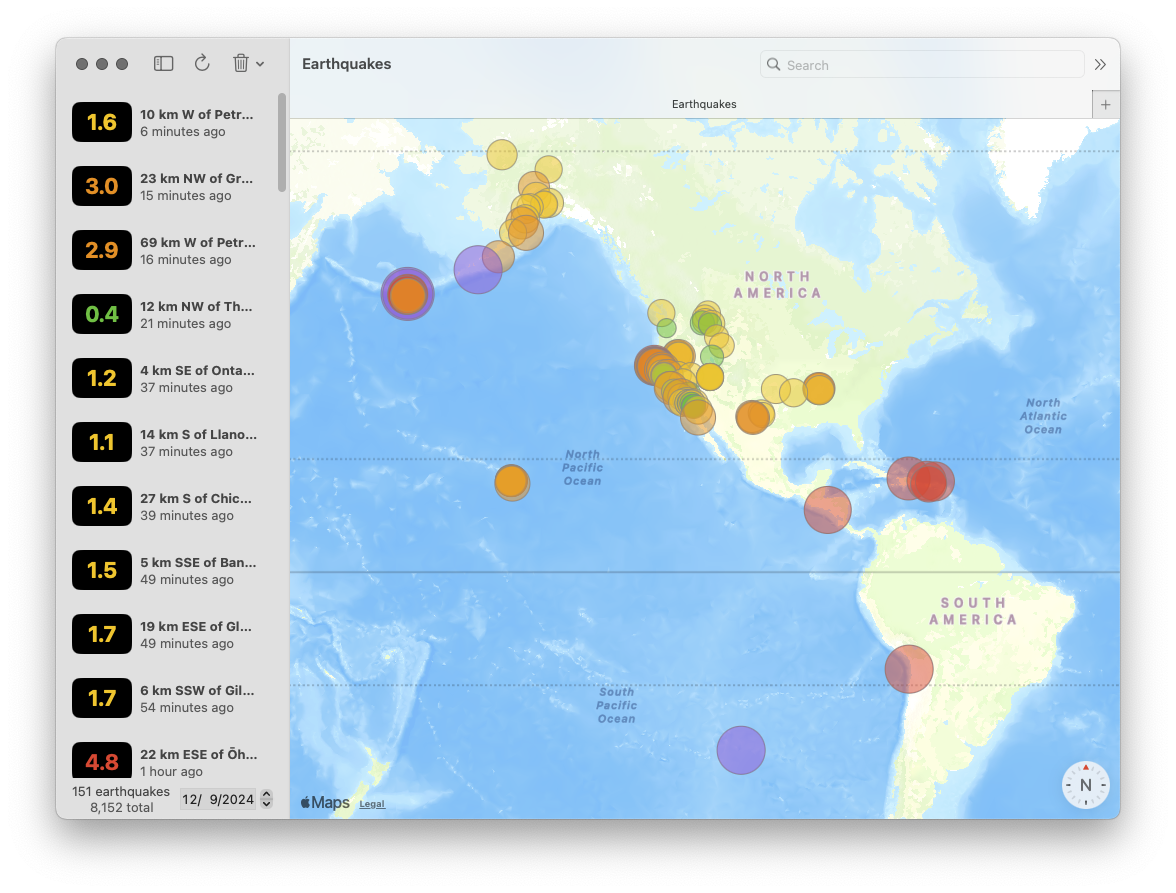
The application launches with an empty list of earthquakes and a map. Tapping the refresh button requests the list of recent earthquakes from the US Geological Survey. After those earthquakes are downloaded from USGS, they are saved to a SwiftData store. If we quit the application and run again, we display the cached Quake values on app launch.
Once we display a list of earthquakes, we have the ability to sort and filter. We can sort by time and magnitude; both properties come with the option to sort forward or reverse. We also have the option to type in our search bar to filter on names.
We also have the ability to filter by calendar date: we display a component to choose a calendar date and this will filter for earthquakes that occurred on that date.
Our map component displays earthquakes consistent with what we view in our list. As we type in our search bar, we can see the earthquakes filtered in our map component. Each earthquake is displays with a circle. The color and size of the circle represent different magnitude values.
Selecting an earthquake from our list component draws its map marker component opaque. We also have the option to delete this selected earthquake from our persistent store from our toolbar. This button also gives us the ability to delete all earthquakes from our persistent store.
The original sample application product from Apple fetches all earthquakes from the previous day. To see for ourselves how well this product performs with large amounts of data, we can hack our sample application to fetch all earthquakes from the previous month:
//  GeoFeatureCollection.swift

static func fetchFeatures() async throws -> GeoFeatureCollection {
    /// Geological data provided by the U.S. Geological Survey (USGS). See ACKNOWLEDGMENTS.txt for additional details.
-    let url = URL(string: "https://earthquake.usgs.gov/earthquakes/feed/v1.0/summary/all_day.geojson")!
+    let url = URL(string: "https://earthquake.usgs.gov/earthquakes/feed/v1.0/summary/all_month.geojson")!
When we build and run our application again, we can fetch all earthquakes from the previous month. With all these earthquakes saved in SwiftData, our application feels slow. This sample application product works with SwiftData on its main thread. Loading earthquakes, filtering earthquakes, and deleting earthquakes now freezes the interface; the spinning wait cursor indicates our main thread is blocked.2
We clone the application with the ImmutableData architecture. Instead of delivering mutable model objects to our component tree, we deliver immutable model values. Instead of performing imperative mutations to transform global state from our component tree, we dispatch action values when user events happen. Once we abstract our SwiftData models out of our component tree, it will be very easy to perform all that expensive work on a background thread. When our component tree is no longer waiting on expensive operations from SwiftData, we can work with much larger amounts of data without blocking our interface.
Quake
Unlike our Animals product, our data model is only one entity: earthquakes. Let’s begin with the type to model one earthquake in our global state. Select the QuakesData package and add a new Swift file under Sources/QuakesData. Name this file Quake.swift.
Here is the main declaration:
//  Quake.swift

import Foundation

public struct Quake: Hashable, Sendable {
  public let quakeId: String
  public let magnitude: Double
  public let time: Date
  public let updated: Date
  public let name: String
  public let longitude: Double
  public let latitude: Double

  package init(
    quakeId: String,
    magnitude: Double,
    time: Date,
    updated: Date,
    name: String,
    longitude: Double,
    latitude: Double
  ) {
    self.quakeId = quakeId
    self.magnitude = magnitude
    self.time = time
    self.updated = updated
    self.name = name
    self.longitude = longitude
    self.latitude = latitude
  }
}

extension Quake: Identifiable {
  public var id: String {
    self.quakeId
  }
}
Here are our properties:
quakeId: A unique identifier for this earthquake.magnitude: The magnitude of this earthquake.time: The UNIX timestamp when this earthquake occurred.updated: Fetching remote data can return new data for earthquake values. Theupdatedproperty returns the UNIX timestamp when this earthquake was last updated with new data.name: AStringwe use to display the location of this earthquake.longitude: The longitude where this earthquake occurred.latitude: The latitude where this earthquake occurred.
Similar to our Animals product, we create some sample data for our Xcode Previews:
//  Quake.swift

extension Quake {
  public static var xxsmall: Self {
    Self(
      quakeId: "xxsmall",
      magnitude: 0.5,
      time: .now,
      updated: .now,
      name: "West of California",
      longitude: -125,
      latitude: 35
    )
  }
  public static var xsmall: Self {
    Self(
      quakeId: "xsmall",
      magnitude: 1.5,
      time: .now,
      updated: .now,
      name: "West of California",
      longitude: -125,
      latitude: 35
    )
  }
  public static var small: Self {
    Self(
      quakeId: "small",
      magnitude: 2.5,
      time: .now,
      updated: .now,
      name: "West of California",
      longitude: -125,
      latitude: 35
    )
  }
  public static var medium: Self {
    Self(
      quakeId: "medium",
      magnitude: 3.5,
      time: .now,
      updated: .now,
      name: "West of California",
      longitude: -125,
      latitude: 35
    )
  }
  public static var large: Self {
    Self(
      quakeId: "large",
      magnitude: 4.5,
      time: .now,
      updated: .now,
      name: "West of California",
      longitude: -125,
      latitude: 35
    )
  }
  public static var xlarge: Self {
    Self(
      quakeId: "xlarge",
      magnitude: 5.5,
      time: .now,
      updated: .now,
      name: "West of California",
      longitude: -125,
      latitude: 35
    )
  }
  public static var xxlarge: Self {
    Self(
      quakeId: "xxlarge",
      magnitude: 6.5,
      time: .now,
      updated: .now,
      name: "West of California",
      longitude: -125,
      latitude: 35
    )
  }
  public static var xxxlarge: Self {
    Self(
      quakeId: "xxxlarge",
      magnitude: 7.5,
      time: .now,
      updated: .now,
      name: "West of California",
      longitude: -125,
      latitude: 35
    )
  }
}
Status
Our operation to fetch earthquake data is asynchronous. Similar to our Animals product, we would like to define a data value to track the status of this operation. Add a new Swift file under Sources/QuakesData. Name this file Status.swift.
//  Status.swift

public enum Status: Hashable, Sendable {
  case empty
  case waiting
  case success
  case failure(error: String)
}
QuakesState
Similar to our Animals product, we define a data type to model the root state of our global system. We pass this state instance to our Store at app launch. Add a new Swift file under Sources/QuakesData. Name this file QuakesState.swift.
//  QuakesState.swift

import Foundation

public struct QuakesState: Hashable, Sendable {
  package var quakes: Quakes

  package init(quakes: Quakes) {
    self.quakes = quakes
  }
}

extension QuakesState {
  public init() {
    self.init(
      quakes: Quakes()
    )
  }
}
Our state has only one domain: Quakes. Here is our declaration:
//  QuakesState.swift

extension QuakesState {
  package struct Quakes: Hashable, Sendable {
    package var data: Dictionary<Quake.ID, Quake> = [:]
    package var status: Status? = nil

    package init(
      data: Dictionary<Quake.ID, Quake> = [:],
      status: Status? = nil
    ) {
      self.data = data
      self.status = status
    }
  }
}
We can now construct the selectors needed for our component tree. Let’s think through the data we need to display:
SelectQuakesValues: OurQuakeListcomponent displays a subset of all theQuakevalue in our system: we filter for earthquakes occurring on a specific calendar day with anameproperty that contains theStringvalue in our search bar. OurQuakeListcomponent displays those earthquakes sorted by magnitude or time: we return anArrayof sorted values.SelectQuakes: OurQuakeMapcomponent should display the same earthquakes as ourQuakeList, but we don’t need to perform a sort operation on this data: our selector will return aDictionaryofQuakevalues without sorting operations.SelectQuakesCount: OurQuakeListcomponent displays the total count of allQuakevalues in our system.SelectQuakesStatus: We return theStatusof our most recent fetch to returnQuakevalues. We use this in our component tree to defend against edge-casey behavior and disable certain user events when a fetch operation is taking place.SelectQuake: Selecting aQuakevalue from ourQuakeListcomponent should highlight that sameQuakevalue. This selector will return aQuakevalue for a givenQuake.ID.
Let’s begin with an extension on Quake that we will use for filter operations:
//  QuakesState.swift

extension Quake {
  fileprivate static func filter(
    searchText: String,
    searchDate: Date
  ) -> @Sendable (Self) -> Bool {
    let calendar = Calendar.autoupdatingCurrent
    let start = calendar.startOfDay(for: searchDate)
    let end = calendar.date(byAdding: DateComponents(day: 1), to: start) ?? start
    let range = start...end
    return { quake in
      if range.contains(quake.time) {
        if searchText.isEmpty {
          return true
        }
        if quake.name.contains(searchText) {
          return true
        }
      }
      return false
    }
  }
}
Our searchText parameter is a String from our search bar. We want to return Quake values if their name contains that String. We also want to return Quake values if their time occurs the same calendar date as our searchDate parameter. We use Calendar from Foundation to transform system times to wall times, then return a closure that we can use for filtering Quake values.
One potential edge-case with this approach is that we don’t control for diacritics or case: "san jose" would not match as equal against "San José". There are more advanced string-matching operations from Swift and Foundation that could help. This is an interesting topic, but it is not blocking us on learning ImmutableData. For now, we continue with the simple approach — strict matching with no transformations applied — and file a mental TODO to investigate this in the future.
Here is our selector for returning a sorted Array of Quake values:
//  QuakesState.swift

extension QuakesState {
  fileprivate func selectQuakesValues(
    filter isIncluded: (Quake) -> Bool,
    sort descriptor: SortDescriptor<Quake>
  ) -> Array<Quake> {
    self.quakes.data.values.filter(isIncluded).sorted(using: descriptor)
  }
}

extension QuakesState {
  fileprivate func selectQuakesValues(
    searchText: String,
    searchDate: Date,
    sort keyPath: KeyPath<Quake, some Comparable> & Sendable,
    order: SortOrder = .forward
  ) -> Array<Quake> {
    self.selectQuakesValues(
      filter: Quake.filter(
        searchText: searchText,
        searchDate: searchDate
      ),
      sort: SortDescriptor(
        keyPath,
        order: order
      )
    )
  }
}

extension QuakesState {
  public static func selectQuakesValues(
    searchText: String,
    searchDate: Date,
    sort keyPath: KeyPath<Quake, some Comparable> & Sendable,
    order: SortOrder = .forward
  ) -> @Sendable (Self) -> Array<Quake> {
    { state in
      state.selectQuakesValues(
        searchText: searchText,
        searchDate: searchDate,
        sort: keyPath,
        order: order
      )
    }
  }
}
We also want a selector for returning the same Quake values without any sorting applied; we return a Dictionary value:
//  QuakesState.swift

extension QuakesState {
  fileprivate func selectQuakes(filter isIncluded: (Quake) -> Bool) -> Dictionary<Quake.ID, Quake> {
    self.quakes.data.filter { isIncluded($0.value) }
  }
}

extension QuakesState {
  fileprivate func selectQuakes(
    searchText: String,
    searchDate: Date
  ) -> Dictionary<Quake.ID, Quake> {
    self.selectQuakes(
      filter: Quake.filter(
        searchText: searchText,
        searchDate: searchDate
      )
    )
  }
}

extension QuakesState {
  public static func selectQuakes(
    searchText: String,
    searchDate: Date
  ) -> @Sendable (Self) -> Dictionary<Quake.ID, Quake> {
    { state in
      state.selectQuakes(
        searchText: searchText,
        searchDate: searchDate
      )
    }
  }
}
Here is SelectQuakesCount:
//  QuakesState.swift

extension QuakesState {
  fileprivate func selectQuakesCount() -> Int {
    self.quakes.data.count
  }
}

extension QuakesState {
  public static func selectQuakesCount() -> @Sendable (Self) -> Int {
    { state in state.selectQuakesCount() }
  }
}
Here is SelectQuakesStatus:
//  QuakesState.swift

extension QuakesState {
  fileprivate func selectQuakesStatus() -> Status? {
    self.quakes.status
  }
}

extension QuakesState {
  public static func selectQuakesStatus() -> @Sendable (Self) -> Status? {
    { state in state.selectQuakesStatus() }
  }
}
Here is SelectQuake:
//  QuakesState.swift

extension QuakesState {
  fileprivate func selectQuake(quakeId: Quake.ID?) -> Quake? {
    guard
      let quakeId = quakeId
    else {
      return nil
    }
    return self.quakes.data[quakeId]
  }
}

extension QuakesState {
  public static func selectQuake(quakeId: Quake.ID?) -> @Sendable (Self) -> Quake? {
    { state in state.selectQuake(quakeId: quakeId) }
  }
}
QuakesAction
Our QuakesAction values will look similar to our AnimalsAction values. Our application needs to perform asynchronous operations. Similar to our Animals product, our Quakes product will construct a Listener type to dispatch thunk operations and a PersistentSession type to dispatch action values after those operations have completed.
We will define two “domains” of actions for our Quakes product: UI and Data. Similar to our Animals product, our UI domain will define action values that come from our component tree and our Data domain will define action values that come from our PersistentSession.
Let’s try running the application from Apple again. Let’s start by documenting the actions we can dispatch from our component tree:
- The
QuakeListcomponent displays a button to fetch the most recent earthquakes from USGS. In the sample project from Apple, this operation fetches the earthquakes from the current day. Let’s make this a little more interesting and add options to fetch earthquakes from the current hour, the current day, the current week, and the current month. - The
QuakeListcomponent displays a button to delete the selectedQuakevalue from our local database. This has no effect on the data from USGS; this is just a local operation. - The
QuakeListcomponent displays a button to delete allQuakevalues from our local database.
In addition, our QuakeList component should dispatch an action will be displayed; this will indicate we are ready to fetch our cached Quake values from our local database.
For our Data domain, there are two action we want to dispatch from our PersistentSession:
- The
Quakevalues were fetched from our local database. - The
Quakevalues were fetched from the USGS database.
Compared to our Animals product, there is a little additional complexity to manage; we now have actions coming from a “local” store and a “remote” store. Let’s see what this looks like. Add a new Swift file under Sources/QuakesData. Name this file QuakesAction.swift.
Here is the main declaration:
//  QuakesAction.swift

public enum QuakesAction: Hashable, Sendable {
  case ui(_ action: UI)
  case data(_ action: Data)
}
Here is our UI domain:
//  QuakesAction.swift

extension QuakesAction {
  public enum UI: Hashable, Sendable {
    case quakeList(_ action: QuakeList)
  }
}

extension QuakesAction.UI {
  public enum QuakeList: Hashable, Sendable {
    case onAppear
    case onTapRefreshQuakesButton(range: RefreshQuakesRange)
    case onTapDeleteSelectedQuakeButton(quakeId: Quake.ID)
    case onTapDeleteAllQuakesButton
  }
}

extension QuakesAction.UI.QuakeList {
  public enum RefreshQuakesRange: Hashable, Sendable {
    case allHour
    case allDay
    case allWeek
    case allMonth
  }
}
Here is our Data domain:
//  QuakesAction.swift

extension QuakesAction {
  public enum Data: Hashable, Sendable {
    case persistentSession(_ action: PersistentSession)
  }
}

extension QuakesAction.Data {
  public enum PersistentSession: Hashable, Sendable {
    case localStore(_ action: LocalStore)
    case remoteStore(_ action: RemoteStore)
  }
}
We define a PersistentSession subdomain with two additional domains below that: LocalStore is for fetches from our local database and RemoteStore is for fetches from the USGS database.
Here is our LocalStore domain:
//  QuakesAction.swift

extension QuakesAction.Data.PersistentSession {
  public enum LocalStore: Hashable, Sendable {
    case didFetchQuakes(result: FetchQuakesResult)
  }
}

extension QuakesAction.Data.PersistentSession.LocalStore {
  public enum FetchQuakesResult: Hashable, Sendable {
    case success(quakes: Array<Quake>)
    case failure(error: String)
  }
}
Here is our RemoteStore domain:
//  QuakesAction.swift

extension QuakesAction.Data.PersistentSession {
  public enum RemoteStore: Hashable, Sendable {
    case didFetchQuakes(result: FetchQuakesResult)
  }
}

extension QuakesAction.Data.PersistentSession.RemoteStore {
  public enum FetchQuakesResult: Hashable, Sendable {
    case success(quakes: Array<Quake>)
    case failure(error: String)
  }
}
PersistentSession
Similar to our Animals product, our PersistentSession will be responsible for performing asynchronous operations on a PersistentStore.
When our query operations succeed or fail, our PersistentSession will then dispatch action values back to our Reducer.
Our mutation operations take a different approach than our Animals product. Our mutation operations return no value. We will see where we transform our global state when we build our Reducer.
Our Animals product constructed a PersistentSession against just one PersistentStore. Our Quakes product needs two: a local store and a remote store.
Add a new Swift file under Sources/QuakesData. Name this file PersistentSession.swift. Let’s start with building two protocols to define the interface of our persistent stores:
//  PersistentSession.swift

import ImmutableData

public protocol PersistentSessionLocalStore: Sendable {
  func fetchLocalQuakesQuery() async throws -> Array<Quake>
  func didFetchRemoteQuakesMutation(
    inserted: Array<Quake>,
    updated: Array<Quake>,
    deleted: Array<Quake>
  ) async throws
  func deleteLocalQuakeMutation(quakeId: Quake.ID) async throws
  func deleteLocalQuakesMutation() async throws
}

public protocol PersistentSessionRemoteStore: Sendable {
  func fetchRemoteQuakesQuery(range: QuakesAction.UI.QuakeList.RefreshQuakesRange) async throws -> Array<Quake>
}
Our LocalStore performs one query and three mutations. Our RemoteStore performs one query. Let’s think through where we need these operations from:
- Our
fetchLocalQuakesQueryoperation should be performed on app launch when ourQuakeListis ready to display. - Our
didFetchRemoteQuakesMutationoperation should be performed when our remote server returnsQuakevalues. TheseQuakevalues will then be merged with the values in our local database. Our Reducer will return for us whichQuakevalues areinserted(new values),updated(existing values with new data), anddeleted(existing values which should be removed). - Our
deleteLocalQuakeMutationoperation should be performed when our user attempts to delete oneQuakevalue from our local database. - Our
deleteLocalQuakesMutationoperation should be performed when our user attempts to delete allQuakevalues from our local database. - Our
fetchRemoteQuakesQueryoperation should be performed when our user attempts to fetchQuakevalues from our remote server. Ourrangeparameter indicates how far back we should request values for.
Here is our PersistentSession built on these two protocols:
//  PersistentSession.swift

final actor PersistentSession<LocalStore, RemoteStore> where LocalStore : PersistentSessionLocalStore, RemoteStore : PersistentSessionRemoteStore {
  private let localStore: LocalStore
  private let remoteStore: RemoteStore

  init(
    localStore: LocalStore,
    remoteStore: RemoteStore
  ) {
    self.localStore = localStore
    self.remoteStore = remoteStore
  }
}
We can now begin to implement the two queries and three mutations that our Listener will need to dispatch. This will all look very similar to what we built for our Animals product. Let’s begin with our thunk operation to fetch the local Quake instances that were persisted to our local database:
//  PersistentSession.swift

extension PersistentSession {
  private func fetchLocalQuakesQuery(
    dispatcher: some ImmutableData.Dispatcher<QuakesState, QuakesAction>,
    selector: some ImmutableData.Selector<QuakesState>
  ) async throws {
    let quakes = try await {
      do {
        return try await self.localStore.fetchLocalQuakesQuery()
      } catch {
        try await dispatcher.dispatch(
          action: .data(
            .persistentSession(
              .localStore(
                .didFetchQuakes(
                  result: .failure(
                    error: error.localizedDescription
                  )
                )
              )
            )
          )
        )
        throw error
      }
    }()
    try await dispatcher.dispatch(
      action: .data(
        .persistentSession(
          .localStore(
            .didFetchQuakes(
              result: .success(
                quakes: quakes
              )
            )
          )
        )
      )
    )
  }
}

extension PersistentSession {
  func fetchLocalQuakesQuery<Dispatcher, Selector>() -> @Sendable (
    Dispatcher,
    Selector
  ) async throws -> Void where Dispatcher: ImmutableData.Dispatcher<QuakesState, QuakesAction>, Selector: ImmutableData.Selector<QuakesState> {
    { dispatcher, selector in
      try await self.fetchLocalQuakesQuery(
        dispatcher: dispatcher,
        selector: selector
      )
    }
  }
}
This should all look similar to what happened in our Animals product. We attempt a query on our LocalStore instance. If that query succeeds, we dispatch a success action to our Dispatcher. If that query fails, we dispatch a failure action.
Here is our thunk operation when our remote server returns Quake values:
//  PersistentSession.swift

extension PersistentSession {
  private func didFetchRemoteQuakesMutation(
    dispatcher: some ImmutableData.Dispatcher<QuakesState, QuakesAction>,
    selector: some ImmutableData.Selector<QuakesState>,
    inserted: Array<Quake>,
    updated: Array<Quake>,
    deleted: Array<Quake>
  ) async throws {
    try await self.localStore.didFetchRemoteQuakesMutation(
      inserted: inserted,
      updated: updated,
      deleted: deleted
    )
  }
}

extension PersistentSession {
  func didFetchRemoteQuakesMutation<Dispatcher, Selector>(
    inserted: Array<Quake>,
    updated: Array<Quake>,
    deleted: Array<Quake>
  ) -> @Sendable (
    Dispatcher,
    Selector
  ) async throws -> Void where Dispatcher: ImmutableData.Dispatcher<QuakesState, QuakesAction>, Selector: ImmutableData.Selector<QuakesState> {
    { dispatcher, selector in
      try await self.didFetchRemoteQuakesMutation(
        dispatcher: dispatcher,
        selector: selector,
        inserted: inserted,
        updated: updated,
        deleted: deleted
      )
    }
  }
}
When our operation to save these Quake values to our LocalStore returns, we do not dispatch an extra action to indicate success or failure. We could choose to define an extra action on QuakesAction.Data.PersistentSession.LocalStore for tracking this operation. Our Reducer and our Listener could then perform any necessary work to manage that error. Since we don’t need more work to happen when this operation was successful, we can skip on dispatching a new action. Error-handling is an important topic that will be very important once you ship complex products at scale. Our tutorial is going to be lightweight on error-handling to keep things focused on teaching ImmutableData, but we encourage you to think creatively about using ImmutableData in ways that would also support your own conventions for robust error-handing.
When we build our Reducer, we will see how we transform our global state “optimistically”: we transform our global state before returning from our persistent database. This is a different approach than our Animals product, where we transformed our global state after returning from our persistent database.
Here is our thunk operation to delete one Quake value:
//  PersistentSession.swift

extension PersistentSession {
  private func deleteLocalQuakeMutation(
    dispatcher: some ImmutableData.Dispatcher<QuakesState, QuakesAction>,
    selector: some ImmutableData.Selector<QuakesState>,
    quakeId: Quake.ID
  ) async throws {
    try await self.localStore.deleteLocalQuakeMutation(quakeId: quakeId)
  }
}

extension PersistentSession {
  func deleteLocalQuakeMutation<Dispatcher, Selector>(quakeId: Quake.ID) async throws -> @Sendable (
    Dispatcher,
    Selector
  ) async throws -> Void where Dispatcher: ImmutableData.Dispatcher<QuakesState, QuakesAction>, Selector: ImmutableData.Selector<QuakesState> {
    { dispatcher, selector in
      try await self.deleteLocalQuakeMutation(
        dispatcher: dispatcher,
        selector: selector,
        quakeId: quakeId
      )
    }
  }
}
Similar to our previous mutation, we do not dispatch an extra action to indicate success or failure.
Here is our thunk operation to delete all Quake values:
//  PersistentSession.swift

extension PersistentSession {
  private func deleteLocalQuakesMutation(
    dispatcher: some ImmutableData.Dispatcher<QuakesState, QuakesAction>,
    selector: some ImmutableData.Selector<QuakesState>
  ) async throws {
    try await self.localStore.deleteLocalQuakesMutation()
  }
}

extension PersistentSession {
  func deleteLocalQuakesMutation<Dispatcher, Selector>() -> @Sendable (
    Dispatcher,
    Selector
  ) async throws -> Void where Dispatcher: ImmutableData.Dispatcher<QuakesState, QuakesAction>, Selector: ImmutableData.Selector<QuakesState> {
    { dispatcher, selector in
      try await self.deleteLocalQuakesMutation(
        dispatcher: dispatcher,
        selector: selector
      )
    }
  }
}
These three mutations follow a similar pattern: we don’t dispatch an extra action to indicate success or failure.
Here is our thunk operation to fetch Quake values from USGS:
//  PersistentSession.swift

extension PersistentSession {
  private func fetchRemoteQuakesQuery(
    dispatcher: some ImmutableData.Dispatcher<QuakesState, QuakesAction>,
    selector: some ImmutableData.Selector<QuakesState>,
    range: QuakesAction.UI.QuakeList.RefreshQuakesRange
  ) async throws {
    let quakes = try await {
      do {
        return try await self.remoteStore.fetchRemoteQuakesQuery(range: range)
      } catch {
        try await dispatcher.dispatch(
          action: .data(
            .persistentSession(
              .remoteStore(
                .didFetchQuakes(
                  result: .failure(
                    error: error.localizedDescription
                  )
                )
              ))
          )
        )
        throw error
      }
    }()
    try await dispatcher.dispatch(
      action: .data(
        .persistentSession(
          .remoteStore(
            .didFetchQuakes(
              result: .success(
                quakes: quakes
              )
            )
          )
        )
      )
    )
  }
}

extension PersistentSession {
  func fetchRemoteQuakesQuery<Dispatcher, Selector>(
    range: QuakesAction.UI.QuakeList.RefreshQuakesRange
  ) -> @Sendable (
    Dispatcher,
    Selector
  ) async throws -> Void where Dispatcher: ImmutableData.Dispatcher<QuakesState, QuakesAction>, Selector: ImmutableData.Selector<QuakesState> {
    { dispatcher, selector in
      try await self.fetchRemoteQuakesQuery(
        dispatcher: dispatcher,
        selector: selector,
        range: range
      )
    }
  }
}
Listener
Our Listener class will perform similar work to what we built for our Animals product. After our Reducer returns, our Listener will receive those action values and dispatch thunk operations to perform asynchronous side effects.
Add a new Swift file under Sources/QuakesData. Name this file Listener.swift.
Here is our main declaration:
//  Listener.swift

import ImmutableData
import Foundation

@MainActor final public class Listener<LocalStore, RemoteStore> where LocalStore : PersistentSessionLocalStore, RemoteStore : PersistentSessionRemoteStore {
  private let session: PersistentSession<LocalStore, RemoteStore>

  private weak var store: AnyObject?
  private var task: Task<Void, any Error>?

  public init(
    localStore: LocalStore,
    remoteStore: RemoteStore
  ) {
    self.session = PersistentSession(
      localStore: localStore,
      remoteStore: remoteStore
    )
  }

  deinit {
    self.task?.cancel()
  }
}
Here is our function to begin listening for Action values:
//  Listener.swift

extension UserDefaults {
  fileprivate var isDebug: Bool {
    self.bool(forKey: "com.northbronson.QuakesData.Debug")
  }
}

extension Listener {
  public func listen(to store: some ImmutableData.Dispatcher<QuakesState, QuakesAction> & ImmutableData.Selector<QuakesState> & ImmutableData.Streamer<QuakesState, QuakesAction> & AnyObject) {
    if self.store !== store {
      self.store = store

      let stream = store.makeStream()

      self.task?.cancel()
      self.task = Task { [weak self] in
        for try await (oldState, action) in stream {
#if DEBUG
          if UserDefaults.standard.isDebug {
            print("[QuakesData][Listener] Old State: \(oldState)")
            print("[QuakesData][Listener] Action: \(action)")
            let newState = store.select({ state in state })
            print("[QuakesData][Listener] New State: \(newState)")
          }
#endif
          guard let self = self else { return }
          await self.onReceive(from: store, oldState: oldState, action: action)
        }
      }
    }
  }
}
This should look familiar. We use the AsyncSequence returned by ImmutableData.Streamer to listen for Action values after our Reducer has returned. We also define a isDebug property on UserDefaults for enabling extra debug logging.
We can now construct receivers for consuming Action values. We can scope and construct receiver functions to keep us from putting all our code in just one function. Here is our first receiver function:
//  Listener.swift

extension Listener {
  private func onReceive(
    from store: some ImmutableData.Dispatcher<QuakesState, QuakesAction> & ImmutableData.Selector<QuakesState>,
    oldState: QuakesState,
    action: QuakesAction
  ) async {
    switch action {
    case .ui(.quakeList(action: let action)):
      await self.onReceive(from: store, oldState: oldState, action: action)
    case .data(.persistentSession(action: let action)):
      await self.onReceive(from: store, oldState: oldState, action: action)
    }
  }
}
Here is a receiver function for our QuakeList domain:
//  Listener.swift

extension Listener {
  private func onReceive(
    from store: some ImmutableData.Dispatcher<QuakesState, QuakesAction> & ImmutableData.Selector<QuakesState>,
    oldState: QuakesState,
    action: QuakesAction.UI.QuakeList
  ) async {
    switch action {
    case .onAppear:
      if oldState.quakes.status == nil,
         store.state.quakes.status == .waiting {
        do {
          try await store.dispatch(
            thunk: self.session.fetchLocalQuakesQuery()
          )
        } catch {
          print(error)
        }
      }
    case .onTapRefreshQuakesButton(range: let range):
      if oldState.quakes.status != .waiting,
         store.state.quakes.status == .waiting {
        do {
          try await store.dispatch(
            thunk: self.session.fetchRemoteQuakesQuery(range: range)
          )
        } catch {
          print(error)
        }
      }
    case .onTapDeleteSelectedQuakeButton(quakeId: let quakeId):
      do {
        try await store.dispatch(
          thunk: self.session.deleteLocalQuakeMutation(quakeId: quakeId)
        )
      } catch {
        print(error)
      }
    case .onTapDeleteAllQuakesButton:
      do {
        try await store.dispatch(
          thunk: self.session.deleteLocalQuakesMutation()
        )
      } catch {
        print(error)
      }
    }
  }
}
There are four Action values we can use for dispatching thunk operations:
- Our
onAppearaction should dispatch a thunk operation to fetchQuakevalues from our local database on app launch. We check againststatusto confirm we are transitioning fromniltowaiting— indicating this is our first attempt. - Our
onTapRefreshQuakesButtonaction should dispatch a thunk operation to fetchQuakevalues from our remote server. We check againststatusto confirm a fetch was not currentlywaiting. - Our
onTapDeleteSelectedQuakeButtonaction should dispatch a thunk operation to delete aQuakevalue from our local database. - Our
onTapDeleteAllQuakesButtonaction should dispatch a thunk operation to delete allQuakevalues from our local database.
We also need to receive Action values from our PersistentSession domain:
//  Listener.swift

extension Listener {
  private func onReceive(
    from store: some ImmutableData.Dispatcher<QuakesState, QuakesAction> & ImmutableData.Selector<QuakesState>,
    oldState: QuakesState,
    action: QuakesAction.Data.PersistentSession
  ) async {
    switch action {
    case .localStore(action: let action):
      await self.onReceive(from: store, oldState: oldState, action: action)
    case .remoteStore(action: let action):
      await self.onReceive(from: store, oldState: oldState, action: action)
    }
  }
}
Here are the next two receivers:
//  Listener.swift

extension Listener {
  private func onReceive(
    from store: some ImmutableData.Dispatcher<QuakesState, QuakesAction> & ImmutableData.Selector<QuakesState>,
    oldState: QuakesState,
    action: QuakesAction.Data.PersistentSession.LocalStore
  ) async {
    switch action {
    default:
      break
    }
  }
}

extension Listener {
  private func onReceive(
    from store: some ImmutableData.Dispatcher<QuakesState, QuakesAction> & ImmutableData.Selector<QuakesState>,
    oldState: QuakesState,
    action: QuakesAction.Data.PersistentSession.RemoteStore
  ) async {
    switch action {
    case .didFetchQuakes(result: let result):
      switch result {
      case .success(quakes: let quakes):
        var inserted = Array<Quake>()
        var updated = Array<Quake>()
        var deleted = Array<Quake>()
        for quake in quakes {
          if oldState.quakes.data[quake.id] == nil,
             store.state.quakes.data[quake.id] != nil {
            inserted.append(quake)
          }
          if let oldQuake = oldState.quakes.data[quake.id],
             let quake = store.state.quakes.data[quake.id],
             oldQuake != quake {
            updated.append(quake)
          }
          if oldState.quakes.data[quake.id] != nil,
             store.state.quakes.data[quake.id] == nil {
            deleted.append(quake)
          }
        }
        do {
          try await store.dispatch(
            thunk: self.session.didFetchRemoteQuakesMutation(
              inserted: inserted,
              updated: updated,
              deleted: deleted
            )
          )
        } catch {
          print(error)
        }
      default:
        break
      }
    }
  }
}
Our Listener class does not need to perform any work when an action from the LocalStore domain is received. We do need to perform work from RemoteStore. Our didFetchQuakes action returns with an Array of Quake values that should be merged into our local database. Instead of passing that Array directly to our PersistentSession, we perform some work to organize the changes: Quake values that were inserted, Quake values that were updated, and Quake values that were deleted. Performing this work here will reduce the amount of work we need to perform in from our SwiftData ModelContext when we save our local database. There are different options for optimizing this work — our biggest concern, for now, is something simple that also runs in linear time.
QuakesReducer
Our next step is to build our Reducer. Remember, a Reducer does not produce side effects itself. Reducers are pure functions: free of side effects. After our Reducer returns, our Listener class will have the opportunity to dispatch thunk operations.
Add a new Swift file under Sources/QuakesData. Name this file QuakesReducer.swift.
Here is our main declaration:
//  QuakesReducer.swift

public enum QuakesReducer {
  @Sendable public static func reduce(
    state: QuakesState,
    action: QuakesAction
  ) throws -> QuakesState {
    switch action {
    case .ui(.quakeList(action: let action)):
      return try self.reduce(state: state, action: action)
    case .data(.persistentSession(action: let action)):
      return try self.reduce(state: state, action: action)
    }
  }
}
As an alternative to “one big switch statement”, we’re going to compose additional reducers once we scope down our Action values. Here is a Reducer just for our QuakeList domain:
//  QuakesReducer.swift

extension QuakesReducer {
  private static func reduce(
    state: QuakesState,
    action: QuakesAction.UI.QuakeList
  ) throws -> QuakesState {
    switch action {
    case .onAppear:
      return self.onAppear(state: state)
    case .onTapRefreshQuakesButton:
      return self.onTapRefreshQuakesButton(state: state)
    case .onTapDeleteSelectedQuakeButton(quakeId: let quakeId):
      return self.deleteSelectedQuake(state: state, quakeId: quakeId)
    case .onTapDeleteAllQuakesButton:
      return self.deleteAllQuakes(state: state)
    }
  }
}
We need to switch over four Action values. We could have written more code in each case, but we choose to construct four smaller functions to keep our switch compact. Here is our onAppear function:
//  QuakesReducer.swift

extension QuakesReducer {
  private static func onAppear(state: QuakesState) -> QuakesState {
    if state.quakes.status == nil {
      var state = state
      state.quakes.status = .waiting
      return state
    }
    return state
  }
}
If our status value is equal to nil, this means we are launching our application. We set our status to waiting to indicate our Listener should begin fetching Quake values from our local database.
Here is our onTapRefreshQuakesButton function:
//  QuakesReducer.swift

extension QuakesReducer {
  private static func onTapRefreshQuakesButton(state: QuakesState) -> QuakesState {
    if state.quakes.status != .waiting {
      var state = state
      state.quakes.status = .waiting
      return state
    }
    return state
  }
}
If we are not currently waiting on a fetch operation, we set the status to be waiting. Our Listener will then begin fetching Quake values from our remote server.
Here is our deleteSelectedQuake function:
//  QuakesReducer.swift

extension QuakesReducer {
  package struct Error: Swift.Error {
    package enum Code: Hashable, Sendable {
      case quakeNotFound
    }

    package let code: Self.Code
  }
}

extension QuakesReducer {
  private static func deleteSelectedQuake(
    state: QuakesState,
    quakeId: Quake.ID
  ) throws -> QuakesState {
    guard let _ = state.quakes.data[quakeId] else {
      throw Error(code: .quakeNotFound)
    }
    var state = state
    state.quakes.data[quakeId] = nil
    return state
  }
}
If our Quake.ID does not return a Quake value, we throw an error. If our Quake.ID does return a Quake value, we delete it.
Let’s think about the different approach we take here compared to our Animals product. Our user action removes the Quake value immediately. This happens before our Listener receives this same user action and before we attempt to remove the Quake value from PersistentSession. This is an example of an optimistic update: we optimistically remove the Quake value from our global state before dispatching an operation to our local database.
When our database contains many Quake values, optimistic updates can help keep our user interface fresh. If our database contains many Quake values, and a user attempts to delete one Quake value, waiting for that operation to return from our local database could lead to our user interface looking “stale” while we wait for the operation to return.
There’s a tradeoff: if we optimistically update our global state, and our local database somehow fails to delete its Quake value, we now have a problem. If the set of Quake values in our global state is no longer the same as the set of Quake values saved in our local database, we would want some way to “roll back” the optimistic update so that our global state once again reflects the local database.
For this product, we assume our local database will not fail. We choose to update our user interface optimistically and expect the operation on our local database to succeed. Is this the right choice for your products? Our updates are very optimistic: we don’t even have a way to roll back the optimistic update if the operation on our local database fails. Before you ship an optimistic update on your own product, think through how you plan to roll back the optimistic update if something goes wrong.
Here is our deleteAllQuakes function:
//  QuakesReducer.swift

extension QuakesReducer {
  private static func deleteAllQuakes(state: QuakesState) -> QuakesState {
    var state = state
    state.quakes.data = [:]
    return state
  }
}
This is another example of an optimistic update: we immediately remove all Quake values from our global state before waiting for our local database to return.
Here is a Reducer for our PersistentSession domain:
//  QuakesReducer.swift

extension QuakesReducer {
  private static func reduce(
    state: QuakesState,
    action: QuakesAction.Data.PersistentSession
  ) throws -> QuakesState {
    switch action {
    case .localStore(.didFetchQuakes(result: let result)):
      return self.didFetchQuakes(state: state, result: result)
    case .remoteStore(.didFetchQuakes(result: let result)):
      return self.didFetchQuakes(state: state, result: result)
    }
  }
}
Here is our function after fetching Quake values from our local database:
extension QuakesReducer {
  private static func didFetchQuakes(
    state: QuakesState,
    result: QuakesAction.Data.PersistentSession.LocalStore.FetchQuakesResult
  ) -> QuakesState {
    var state = state
    switch result {
    case .success(quakes: let quakes):
      var data = state.quakes.data
      for quake in quakes {
        data[quake.id] = quake
      }
      state.quakes.data = data
      state.quakes.status = .success
    case .failure(error: let error):
      state.quakes.status = .failure(error: error)
    }
    return state
  }
}
Here is our function after fetching Quake values from our remote server:
//  QuakesReducer.swift

extension QuakesReducer {
  private static func didFetchQuakes(
    state: QuakesState,
    result: QuakesAction.Data.PersistentSession.RemoteStore.FetchQuakesResult
  ) -> QuakesState {
    var state = state
    switch result {
    case .success(quakes: let quakes):
      var data = state.quakes.data
      for quake in quakes {
        if .zero < quake.magnitude {
          data[quake.id] = quake
        } else {
          data[quake.id] = nil
        }
      }
      state.quakes.data = data
      state.quakes.status = .success
    case .failure(error: let error):
      state.quakes.status = .failure(error: error)
    }
    return state
  }
}
The USGS database can return earthquakes with magnitude less than or equal to zero. We filter these earthquake results out of our state. For our purposes, we only care about displaying earthquakes with a magnitude greater than zero.
QuakesFilter
Our Selector to display Quake values in our QuakeList component runs in O(n log n) time. We do have the option to include a Dependency on our Selector, but this Dependency then performs an equality check that runs in O(n) time. We can pass a Filter to our Selector and reduce the set of Action values that lead to our Selector performing work. Our Filter will return in O(1) time, which is much faster than the O(n) time needed to check if our Dependencies have changed.
Our Reducer defines exactly what Action values can lead to Quake values changing in our State. Let’s construct a Filter for these. Add a new Swift file under Sources/QuakesData. Name this file QuakesFilter.swift.
//  QuakesFilter.swift

public enum QuakesFilter {

}

extension QuakesFilter {
  public static func filterQuakes() -> @Sendable (QuakesState, QuakesAction) -> Bool {
    { oldState, action in
      switch action {
      case .ui(.quakeList(.onTapDeleteSelectedQuakeButton)):
        return true
      case .ui(.quakeList(.onTapDeleteAllQuakesButton)):
        return true
      case .data(.persistentSession(.localStore(.didFetchQuakes(.success)))):
        return true
      case .data(.persistentSession(.remoteStore(.didFetchQuakes(.success)))):
        return true
      default:
        return false
      }
    }
  }
}
Remember to build Filters that return in constant time. We don’t recommend performing expensive computations in Filters — just quick operations over State and Action values. Because Filters return in constant time, prioritize writing Filters to optimize Selectors that need to perform expensive computations in greater than constant time.
LocalStore
Our PersistentSession class depended on the PersistentSessionLocalStore protocol for its local database. Let’s construct an implementation of this protocol we can use when running our application. We have multiple technologies that can read and write data to our filesystem; we’re going to continue using SwiftData. We already have some practice building against SwiftData from our Animals product. Our new LocalStore will function in similar ways.
Remember, our goal is not to teach SwiftData: our goal is to teach ImmutableData. We want to write efficient SwiftData, but we don’t spend too much time or energy blocking our tutorial on writing the most optimized SwiftData possible. Let’s build something simple and straight forward. If we want to think creatively about optimizing this work in the future, we can always come back to improve what we built.
Add a new Swift file under Sources/QuakesData. Name this file LocalStore.swift.
We begin with a PersistentModel to shadow our Quake values:
//  LocalStore.swift

import Foundation
import SwiftData

@Model final package class QuakeModel {
  package var quakeId: String
  package var magnitude: Double
  package var time: Date
  package var updatedTime: Date
  package var name: String
  package var longitude: Double
  package var latitude: Double

  package init(
    quakeId: String,
    magnitude: Double,
    time: Date,
    updatedTime: Date,
    name: String,
    longitude: Double,
    latitude: Double
  ) {
    self.quakeId = quakeId
    self.magnitude = magnitude
    self.time = time
    self.updatedTime = updatedTime
    self.name = name
    self.longitude = longitude
    self.latitude = latitude
  }
}
There seems to be a known issue in SwiftData that leads to unexpected behaviors when properties are named updated.3 We workaround this issue by renaming our updated property to updatedTime.
Here is a function for returning an immutable Quake value from QuakeModel:
//  LocalStore.swift

extension QuakeModel {
  fileprivate func quake() -> Quake {
    Quake(
      quakeId: self.quakeId,
      magnitude: self.magnitude,
      time: self.time,
      updated: self.updatedTime,
      name: self.name,
      longitude: self.longitude,
      latitude: self.latitude
    )
  }
}
Here is the other direction: returning a QuakeModel from an immutable Quake value:
//  LocalStore.swift

extension Quake {
  fileprivate func model() -> QuakeModel {
    QuakeModel(
      quakeId: self.quakeId,
      magnitude: self.magnitude,
      time: self.time,
      updatedTime: self.updated,
      name: self.name,
      longitude: self.longitude,
      latitude: self.latitude
    )
  }
}
We would also like a function for updating an existing QuakeModel reference with a new Quake value:
//  LocalStore.swift

extension QuakeModel {
  fileprivate func update(with quake: Quake) {
    self.quakeId = quake.quakeId
    self.magnitude = quake.magnitude
    self.time = quake.time
    self.updatedTime = quake.updated
    self.name = quake.name
    self.longitude = quake.longitude
    self.latitude = quake.latitude
  }
}
Here are two utilities on ModelContext that will save us some time when we perform our queries and mutations:
//  LocalStore.swift

extension ModelContext {
  fileprivate func fetch<T>(_ type: T.Type) throws -> Array<T> where T : PersistentModel {
    try self.fetch(
      FetchDescriptor<T>()
    )
  }
}

extension ModelContext {
  fileprivate func fetch<T>(_ predicate: Predicate<T>) throws -> Array<T> where T : PersistentModel {
    try self.fetch(
      FetchDescriptor(predicate: predicate)
    )
  }
}
Similar to our Animals product, we construct a ModelActor for performing work on SwiftData:
//  LocalStore.swift

final package actor ModelActor: SwiftData.ModelActor {
  package nonisolated let modelContainer: ModelContainer
  package nonisolated let modelExecutor: any ModelExecutor

  fileprivate init(modelContainer: ModelContainer) {
    self.modelContainer = modelContainer
    let modelContext = ModelContext(modelContainer)
    modelContext.autosaveEnabled = false
    self.modelExecutor = DefaultSerialModelExecutor(modelContext: modelContext)
  }
}
We set autosaveEnabled to false to workaround a potential issue from SwiftUI.4
Let’s turn our attention to the functions declared from PersistentSessionLocalStore. Here is our query to fetch all Quake values saved in our local database:
//  LocalStore.swift

extension ModelActor {
  fileprivate func fetchLocalQuakesQuery() throws -> Array<Quake> {
    let array = try self.modelContext.fetch(QuakeModel.self)
    return array.map { model in model.quake() }
  }
}
This should look familiar to what we built for our Animals product. Our LocalStore operates on QuakeModel classes, but we return immutable Quake values to our component tree. Our component tree does not need to know about QuakeModel: this is an implementation detail.
Here is our mutation for updating our local database with Quake values from our remote server:
//  LocalStore.swift

extension ModelActor {
  package struct Error: Swift.Error {
    package enum Code: Equatable {
      case quakeNotFound
    }

    package let code: Self.Code
  }
}

extension ModelActor {
  fileprivate func didFetchRemoteQuakesMutation(
    inserted: Array<Quake>,
    updated: Array<Quake>,
    deleted: Array<Quake>
  ) throws {
    for quake in inserted {
      let model = quake.model()
      self.modelContext.insert(model)
    }
    if updated.isEmpty == false {
      let set = Set(updated.map { $0.quakeId })
      let predicate = #Predicate<QuakeModel> { model in
        set.contains(model.quakeId)
      }
      let dictionary = Dictionary(uniqueKeysWithValues: updated.map { ($0.quakeId, $0) })
      for model in try self.modelContext.fetch(predicate) {
        guard
          let quake = dictionary[model.quakeId]
        else {
          throw Error(code: .quakeNotFound)
        }
        model.update(with: quake)
      }
    }
    if deleted.isEmpty == false {
      let set = Set(deleted.map { $0.quakeId })
      let predicate = #Predicate<QuakeModel> { model in
        set.contains(model.quakeId)
      }
      try self.modelContext.delete(
        model: QuakeModel.self,
        where: predicate
      )
    }
    try self.modelContext.save()
  }
}
Let’s think through what we are trying to accomplish:
- We begin by iterating through our
insertedvalues. These are newQuakevalues that did not previously exist in our state. We iterate through everyQuakevalue, create aQuakeModel, and insert that model in ourModelContext. - We iterate through our
updatedvalues. These are existingQuakevalues with some new data that should be saved. We fetch the necessaryQuakeModelreferences and update each one with the new data. To defend against an “unnecessary quadratic”, we transform ourArrayofQuakevalues to aDictionaryin linear time. We can then select aQuakevalue for aQuake.IDin constant time. - We iterate through our
deletedvalues. These are existingQuakevalues that should be deleted. We construct aPredicateto delete the necessaryQuakeModelreferences and forward that to ourModelContext. - We save our
ModelContext.
In a production application, we would spend a lot more time profiling and optimizing this function to continue improving performance. Since our goal is continue focusing on ImmutableData, we do not spend much more time focusing on SwiftData performance. This is an important topic; it’s just not the right topic for us at this time. The good news is that LocalStore is an actor: all this work will be performed off our main thread.
Here is our mutation for deleting one Quake value:
//  LocalStore.swift

extension ModelActor {
  fileprivate func deleteLocalQuakeMutation(quakeId: Quake.ID) throws {
    let predicate = #Predicate<QuakeModel> { model in
      model.quakeId == quakeId
    }
    try self.modelContext.delete(
      model: QuakeModel.self,
      where: predicate
    )
    try self.modelContext.save()
  }
}
Here is our mutation for deleting all Quake values:
//  LocalStore.swift

extension ModelActor {
  fileprivate func deleteLocalQuakesMutation() throws {
    try self.modelContext.delete(model: QuakeModel.self)
    try self.modelContext.save()
  }
}
We can now build our LocalStore with a similar pattern to our Animals product:
//  LocalStore.swift

final public actor LocalStore {
  lazy package var modelActor = ModelActor(modelContainer: self.modelContainer)

  private let modelContainer: ModelContainer

  private init(modelContainer: ModelContainer) {
    self.modelContainer = modelContainer
  }
}
Here is a new private constructor to help us in our next steps:
//  LocalStore.swift

extension LocalStore {
  private init(
    schema: Schema,
    configuration: ModelConfiguration
  ) throws {
    let container = try ModelContainer(
      for: schema,
      configurations: configuration
    )
    self.init(modelContainer: container)
  }
}
Here are two new public constructors:
//  LocalStore.swift

extension LocalStore {
  private static var models: Array<any PersistentModel.Type> {
    [QuakeModel.self]
  }
}

extension LocalStore {
  public init(url: URL) throws {
    let schema = Schema(Self.models)
    let configuration = ModelConfiguration(url: url)
    try self.init(
      schema: schema,
      configuration: configuration
    )
  }
}

extension LocalStore {
  public init(isStoredInMemoryOnly: Bool = false) throws {
    let schema = Schema(Self.models)
    let configuration = ModelConfiguration(isStoredInMemoryOnly: isStoredInMemoryOnly)
    try self.init(
      schema: schema,
      configuration: configuration
    )
  }
}
Here are the functions declared from PersistentSessionLocalStore forwarded to our ModelActor:
//  LocalStore.swift

extension LocalStore: PersistentSessionLocalStore {
  public func fetchLocalQuakesQuery() async throws -> Array<Quake> {
    try await self.modelActor.fetchLocalQuakesQuery()
  }

  public func didFetchRemoteQuakesMutation(
    inserted: Array<Quake>,
    updated: Array<Quake>,
    deleted: Array<Quake>
  ) async throws {
    try await self.modelActor.didFetchRemoteQuakesMutation(
      inserted: inserted,
      updated: updated,
      deleted: deleted
    )
  }

  public func deleteLocalQuakeMutation(quakeId: Quake.ID) async throws {
    try await self.modelActor.deleteLocalQuakeMutation(quakeId: quakeId)
  }

  public func deleteLocalQuakesMutation() async throws {
    try await self.modelActor.deleteLocalQuakesMutation()
  }
}
RemoteStore
Before we launch our application, we need to construct a type that adopts PersistentSessionRemoteStore. This will be our type for fetching Quake values from USGS using a network request.
Add a new Swift file under Sources/QuakesData. Name this file RemoteStore.swift. Our data schema is defined for us by USGS.5 Because the data is well-defined, we can leverage Codable and JSONDecoder for serialization. Let’s begin with some types we will use for modeling our remote response from USGS:
//  RemoteStore.swift

import Foundation

package struct RemoteResponse: Hashable, Codable, Sendable {
  private let features: Array<Feature>
}

extension RemoteResponse {
  fileprivate struct Feature: Hashable, Codable, Sendable {
    let properties: Properties
    let geometry: Geometry
    let id: String
  }
}

extension RemoteResponse.Feature {
  struct Properties: Hashable, Codable, Sendable {
    //  Earthquakes from USGS can have null magnitudes.
    //  ¯\_(ツ)_/¯
    let mag: Double?
    let place: String
    let time: Date
    let updated: Date
  }
}

extension RemoteResponse.Feature {
  struct Geometry: Hashable, Codable, Sendable {
    let coordinates: Array<Double>
  }
}
We have to code defensively around magnitude: USGS can return null for this property.6
Here is a function to transform a Feature from USGS to one of our own Quake values:
//  RemoteStore.swift

extension RemoteResponse.Feature {
  var quake: Quake {
    Quake(
      quakeId: self.id,
      magnitude: self.properties.mag ?? 0.0,
      time: self.properties.time,
      updated: self.properties.updated,
      name: self.properties.place,
      longitude: self.geometry.coordinates[0],
      latitude: self.geometry.coordinates[1]
    )
  }
}
Here is a function to return an Array of Quake values from a remote response:
//  RemoteStore.swift

extension RemoteResponse {
  fileprivate func quakes() -> Array<Quake> {
    self.features.map { $0.quake }
  }
}
Our RemoteStore will perform a network request. We could add a dependency on URLSession directly in our implementation, but that would limit our ability to run unit tests against all of this. It would be better to define our networking requirements in a protocol that our RemoteStore can depend on. To save ourselves time, we define a protocol that returns typed data from a JSON response. We provide the type and the protocol will perform a network request, serialize the data, and throw and error if something went wrong:
//  RemoteStore.swift

public protocol RemoteStoreNetworkSession: Sendable {
  func json<T>(
    for request: URLRequest,
    from decoder: JSONDecoder
  ) async throws -> T where T : Decodable
}
Now, we can build our RemoteStore. Here is the main declaration:
//  RemoteStore.swift

final public actor RemoteStore<NetworkSession>: PersistentSessionRemoteStore where NetworkSession : RemoteStoreNetworkSession {
  private let session: NetworkSession

  public init(session: NetworkSession) {
    self.session = session
  }
}
Our user has the ability to request earthquakes for the current hour, the current day, the current week, and the current month. Fortunately, USGS makes this easy: there are custom endpoints just for delivering these four options:
//  RemoteStore.swift

extension RemoteStore {
  private static func url(range: QuakesAction.UI.QuakeList.RefreshQuakesRange) -> URL? {
    switch range {
    case .allHour:
      return URL(string: "https://earthquake.usgs.gov/earthquakes/feed/v1.0/summary/all_hour.geojson")
    case .allDay:
      return URL(string: "https://earthquake.usgs.gov/earthquakes/feed/v1.0/summary/all_day.geojson")
    case .allWeek:
      return URL(string: "https://earthquake.usgs.gov/earthquakes/feed/v1.0/summary/all_week.geojson")
    case .allMonth:
      return URL(string: "https://earthquake.usgs.gov/earthquakes/feed/v1.0/summary/all_month.geojson")
    }
  }
}
We can use this URL to construct a URLRequest:
//  RemoteStore.swift

extension RemoteStore {
  package struct Error : Swift.Error {
    package enum Code: Equatable {
      case urlError
    }

    package let code: Self.Code
  }
}

extension RemoteStore {
  private static func networkRequest(range: QuakesAction.UI.QuakeList.RefreshQuakesRange) throws -> URLRequest {
    guard
      let url = Self.url(range: range)
    else {
      throw Error(code: .urlError)
    }
    return URLRequest(url: url)
  }
}
We can use this URLRequest to perform our query against our NetworkSession:
//  RemoteStore.swift

extension RemoteStore {
  public func fetchRemoteQuakesQuery(range: QuakesAction.UI.QuakeList.RefreshQuakesRange) async throws -> Array<Quake> {
    let networkRequest = try Self.networkRequest(range: range)
    let decoder = JSONDecoder()
    decoder.dateDecodingStrategy = .millisecondsSince1970
    let response: RemoteResponse = try await self.session.json(
      for: networkRequest,
      from: decoder
    )
    return response.quakes()
  }
}
Here is our QuakesData package (including the tests available on our chapter-10 branch):
QuakesData
├── Sources
│   └── QuakesData
│       ├── Listener.swift
│       ├── LocalStore.swift
│       ├── PersistentSession.swift
│       ├── Quake.swift
│       ├── QuakesAction.swift
│       ├── QuakesFilter.swift
│       ├── QuakesReducer.swift
│       ├── QuakesState.swift
│       ├── RemoteStore.swift
│       └── Status.swift
└── Tests
    └── QuakesDataTests
        ├── ListenerTests.swift
        ├── LocalStoreTests.swift
        ├── QuakesFilterTests.swift
        ├── QuakesReducerTests.swift
        ├── QuakesStateTests.swift
        ├── RemoteStoreTests.swift
        └── TestUtils.swift
We wrote a lot of code, but most of these ideas and concepts are also built in our Animals product. Our biggest difference is we are now supporting a data model with a local database and a remote server.